
Shadow IT is any software, hardware, or cloud service used without IT knowledge or approval.
Shadow IT usually occurs because employees are trying new tools to help with their job. They sign up for a project management tool with their work email, use a personal Dropbox to share files with a client, or create a ChatGPT account to help draft a proposal. In 2022, Gartner estimated that 41% of employees acquired or modified technology outside IT's visibility. By 2027, they predict that number will reach 75%, driven in large part by AI tools that employees are adopting on their own.
The problem is that each of these unmanaged accounts creates exposure that IT can't see or control. For example, an employee has a habit of reusing passwords across accounts. If IT can’t monitor credential health, a breach could compromise all accounts with the same password. And when employees upload work files or customer data to tools that haven't been vetted for security or compliance, that data is sitting on a platform your organization has no agreement with and no visibility into. The average company now uses around 106 SaaS applications, and 56% report that sensitive data gets uploaded to these unvetted applications. 1 in 3 security breaches now involve shadow IT or shadow AI, at an average cost exceeding $4 million per incident.
In this post, we look at six Shadow IT solutions, including:
- LastPass – A secure access tool that detects Shadow IT through the browser extension your team already uses for credential management. This option works well for small to midsize companies that want Shadow IT visibility without deploying new infrastructure or hiring dedicated security staff, because there are no agents or network configuration required.
- Microsoft Defender for Cloud Apps – A CASB (Cloud Access Security Broker) built into Microsoft's enterprise security stack. It monitors network traffic for unsanctioned cloud app usage through firewall and proxy log analysis. Microsoft Defender makes sense for organizations already invested in the Microsoft 365 ecosystem, since it integrates natively with Microsoft Entra, Defender XDR, and the rest of Microsoft's security tooling.
- Grip Security– An identity-first SaaS security platform that discovers Shadow IT by correlating SaaS accounts to corporate identities and email domains, without requiring network-level monitoring. Grip Security is a good option for mid-to-large enterprises that want full SaaS lifecycle governance, including automated offboarding workflows and app onboarding approvals, without deploying a network-level CASB.
- Nudge Security – Discovers SaaS usage by monitoring email-based sign-ups tied to your company's domain. Because it connects to your Google Workspace or Microsoft 365 email system and uses machine learning to detect account creation patterns, deployment is lightweight, but the platform is built for security teams at mid-to-large organizations who need to manage SaaS sprawl across hundreds of apps.
- Netskope – A dedicated enterprise CASB with a catalog of over 80,000 cloud apps, advanced DLP with 3,000+ data classifiers, and GenAI-specific controls that can inspect prompts submitted to AI tools in real time. Companies choose Netskope when they need the deepest possible visibility into cloud app usage and data movement, but it requires significant infrastructure and a dedicated security team to deploy and manage.
- Torii – A SaaS management platform that integrates with your identity provider, SSO, and expense systems to discover and manage applications across your organization. Torii is a good fit for IT and procurement teams managing large SaaS portfolios who need automated workflows for app onboarding, license optimization, and compliance reporting.
1. LastPass: a shadow IT solution for small-to-midsize businesses
LastPass is a secure access tool built for small to midsize businesses. It detects and controls Shadow IT through the same browser extension your employees use for autofill. Because the extension sees login activity as it happens, it shows you which apps employees are signing into and how they're logging in (personal vs. corporate credentials, SSO vs. password).
From there, you can approve, warn against, or block specific applications. There's no additional agent software to install, no network configuration, and no separate enterprise tool to deploy. It works the moment employees have the extension installed.
And because LastPass also handles credential management — generating strong passwords, storing them in an encrypted vault, and letting you revoke access when someone leaves — you get Shadow IT detection, enforcement, and credential security in a single tool rather than stitching together separate platforms for each.
To learn more about how you can use LastPass to limit your Shadow IT exposure and increase secure access throughout your organization, you can:
Or keep reading below to learn more.
How LastPass detects Shadow IT
Because the LastPass browser extension sees login activity as it happens, it identifies what apps your employees are using, how they're logging in, and whether they're using personal or corporate credentials. All of this data shows up on your admin dashboard, which gives you a full picture of your organization's app usage, including:
- How many apps have been discovered across your team
- How employees are logging in (SSO, vaulted password, passkey, or unvaulted password)
- Whether they're using personal or corporate credentials
- Which apps haven't been used in the last 30 days
- Which credentials are sitting outside the vault

In the screenshot above, you can see that four employees are using ChatGPT, two with corporate accounts and two with personal ones. You can see whether they created passwords or used SSO, and when they last logged in. From there, you can decide how to handle it.
Learn more about SaaS Monitoring here
How LastPass helps you regulate employee access
Once you can see what your employees are using, the next step is controlling access. LastPass lets you set app-level policies directly from your admin dashboard.
With SaaS protect, you can:
- Block unapproved applications outright. Users who attempt to access a blocked app will see a customizable block screen in their browser. You can explain why the app is blocked or direct users to an approved alternative.
- Attach warning messages that employees see when they try to log in to a specific tool. For example, if employees are signing into a generative AI tool, you can set up a message reminding them not to share confidential company data, without blocking access.
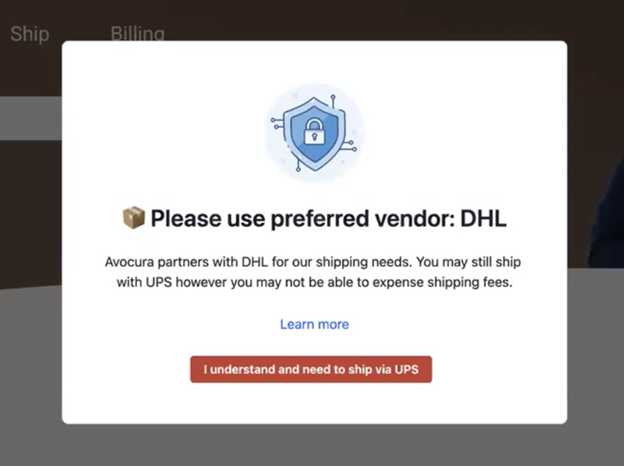
- Allow access with informational pop-ups. For example, if your company uses DHL as a shipping provider, you can set up a pop-up when an employee goes to UPS or FedEx, reminding them of the approved vendor.
Axxor, a global manufacturer with facilities in the Netherlands, Poland, and the US, used LastPass SaaS Monitoring to surface employee logins to AI tools like OpenAI and Canva. As their IT lead put it, "We don't want to block innovation, but we do want to guide it safely." The dashboard gave them the visibility to see which tools employees were using and decide which ones to bring under management.
Learn more about SaaS Protect here
How credential management helps reduce your Shadow IT exposure
Even after you discover Shadow IT, there's still the credential problem: Employees who sign up for unsanctioned tools often use weak or reused passwords, and those credentials become attack vectors. LastPass solves this by generating strong, unique passwords and storing them in a Zero Knowledge vault protected with AES-256 encryption. “Zero Knowledge” means we never have access to your master password or stored data.
When someone leaves or changes roles, their access should be revoked in the Sharing Center and any shared passwords reset. This prevents former employees from retaining access to business accounts.
Employees also get a free LastPass Families account, which lets them manage work and personal credentials with one login but in separate vaults.
Granular admin controls
With LastPass, you have over 120 security policies you can enable, and you can scope each one to specific users or groups.
For example:
- Require MFA for your finance team when they access banking portals
- Block logins from TOR networks across your entire org
- Enforce a minimum password length of 16 characters for company credentials
- Set different rules for contractors versus full-time employees
When you first sign up, LastPass provides a recommended set of default policies, so you're not configuring everything from scratch. From there, you can adjust based on what your team needs.
An easy-to-use browser extension that promotes secure access
The LastPass browser extension is available for Chrome, Firefox, Safari, and Edge. The browser extension is where your employees will do most of their day-to-day work with LastPass.
When an employee goes to a site they have credentials for, the extension autofills their username and password. When they sign up for a new tool, LastPass generates a strong, randomized password right in the browser and prompts them to save it to their vault. This directly reduces the password reuse that makes Shadow IT dangerous in the first place.
You control what your team has access to through shared folders in the LastPass vault. You can create folders by team, function, or project (social media accounts, vendor logins, software licenses, API tokens), and set permissions for who can see each folder. When someone's role changes, you update their folder access from the admin console.
Start your free LastPass trial today
You can try LastPass free for 14 days with full access to the vault, browser extension, admin policies, Security Dashboard, and SaaS Monitoring.
Setup takes minutes. You create your account, invite your team, and your employees install the browser extension. OTO Technology, a managed service provider that deploys LastPass for its clients across France, the US, and Japan, found that onboarding takes under five minutes per user.
And once employees start using it, adoption tends to follow. HOLT CAT, a Caterpillar equipment dealer with 3,500+ employees, used all 2,500 of their initial seats in the first year. By year two, they expanded to 3,500 seats with 70% adoption, driven in part by employees requesting access on their own after seeing how easy the tool was to use.
If you need help along the way, we have 24/7 support by phone, email, or chat.
Start your 14-day free trial or request a demo.
2. Microsoft Defender for Cloud Apps (CASB)

Microsoft Defender for Cloud Apps (formerly Microsoft Cloud App Security) is a full-featured CASB that discovers shadow IT by analyzing traffic logs from firewalls, proxies, and endpoint agents.
Microsoft Defender maintains a catalog of over 33,000 cloud apps, allowing it to identify and risk-score the services your employees are using based on 90+ risk factors. From there, you get granular visibility into user activities within both sanctioned and unsanctioned apps.
Enforcement capabilities include blocking access to unsanctioned apps, applying session controls (like preventing file downloads from risky apps), and integrating with Conditional Access policies in Microsoft Entra.
Microsoft Defender for Cloud Apps (MDCA) is best suited for organizations already invested in the Microsoft 365 E5 ecosystem, as it's included in E5 licensing or available as a standalone add-on. Organizations that don't use Microsoft 365 as their primary productivity suite will find integration more complex and may not get the full benefit of the platform's native connections.
To get visibility with MDCA, you’ll deploy a log collector to receive logs from your firewalls and proxies, but the need for firewall/proxy configuration is removed with Defender for Endpoint. Either way, tuning policies to avoid false positives still require an IT or security team to manage on an ongoing basis.
For companies without existing Microsoft E5 licensing or a dedicated security team, the complexity and prerequisite infrastructure make this a heavy lift. Microsoft Defender is a powerful shadow IT solution, but it's designed for organizations with the resources to operate it.
3. Grip Security
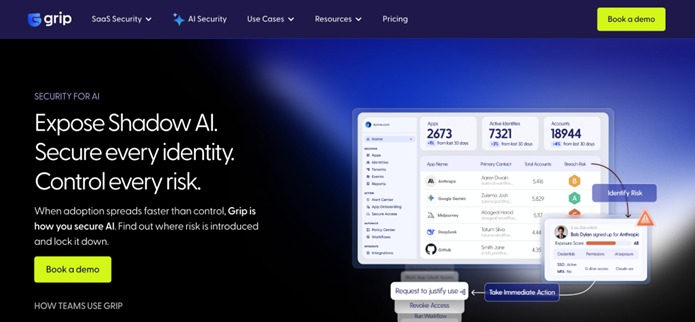
Grip Security takes an identity-first approach to Shadow IT detection. Rather than monitoring network traffic, Grip correlates SaaS accounts to users and corporate identities.
The platform is particularly strong at detecting abandoned accounts and zombie credentials. These areSaaS accounts that employees signed up for, used briefly, and forgot about, but which still have active credentials that create ongoing risk.
Grip is designed for mid-market and enterprise organizations. Pricing is not publicly listed and typically requires a sales conversation.
Unlike LastPass, Grip doesn't include password management or credential storage. It's purely a discovery and governance layer. You'd still need a separate tool for secure credential management, autofill, and enforcement of password policies, meaning your tech stack grows rather than consolidates.
4. Nudge Security
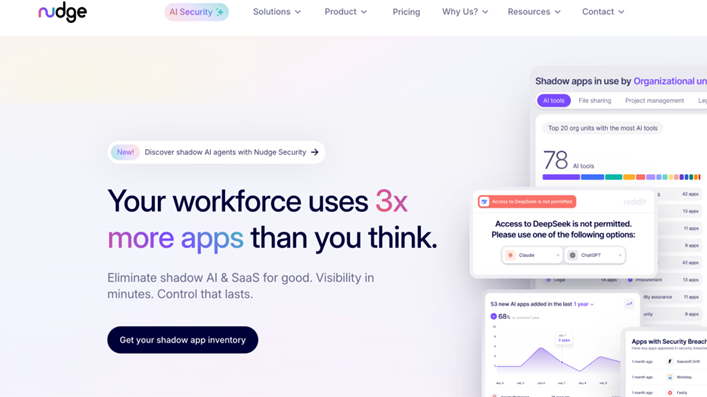
Nudge Security discovers SaaS accounts created by anyone in your organization by monitoring email-based account creation events.
The platform takes a "nudge" approach to Shadow IT: rather than blocking access outright, it sends contextual prompts to employees encouraging them to use approved alternatives or follow security best practices.
Nudge also tracks OAuth grants and provides visibility into which apps can access your data through integrations. Because its discovery method is email-based, it can find accounts retroactively, which is useful for understanding your full Shadow IT footprint from the start.
While Nudge Security originally took a nudge-only approach, they've since added a browser extension that can guide employees away from unapproved apps at the point of sign-up, expanding the platform beyond email-based discovery into real-time browser-level nudges.
5. Netskope
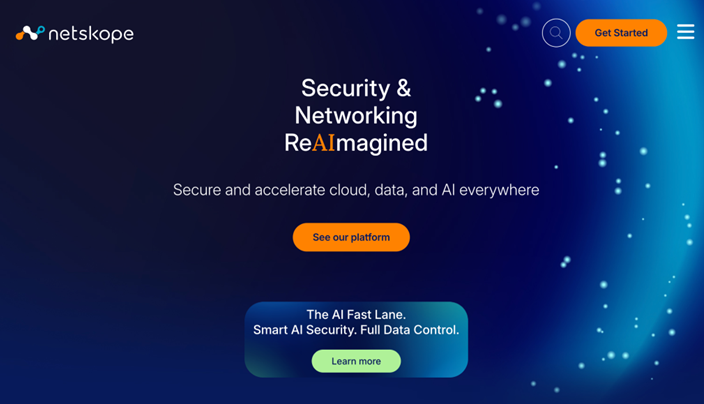
Netskope is an SASE (Secure Access Service Edge) platform with CASB capabilities. It provides deep visibility into cloud app usage with the ability to distinguish between corporate and personal instances of the same app, so for example you can see who is logging into the corporate Dropbox versus their personal Dropbox account.
Where Netskope excels is in granular, context-aware policies. It can control specific user actions such as allowing read-only access while blocking uploads of sensitive data. You can also permit access to a tool from managed devices but block it from personal ones. This level of nuance is valuable for organizations with complex security requirements.
The platform uses a lightweight client (Netskope Client) deployed on endpoints plus API connectors for sanctioned apps. This is a more involved Shadow IT tool than a browser extension but less complex than traditional proxy-based CASBs that require full network infrastructure changes.
6. Torii

Torii is a SaaS management platform that approaches Shadow IT from an IT operations and cost optimization angle rather than pure security. It discovers Shadow IT through integrations with your identity provider, SSO, expense systems, and browser telemetry — pulling from multiple data sources to build a comprehensive inventory of SaaS usage across your organization.
Torii's primary value proposition is SaaS optimization: identifying unused licenses, redundant tools, and Shadow apps so IT can reduce spend and consolidate the tech stack. If you're paying for three different project management tools because different teams each adopted their own, Torii helps you see that to facilitate more informed decision making.
The platform also includes automated workflows for onboarding and offboarding. It can revoke access across discovered SaaS apps automatically. And it gives you cost governance: showing what you're spending on SaaS, identifying waste, and helping you negotiate renewals with usage data.
Torii is built for IT operations teams at mid-market companies (100–5,000 employees). Pricing is custom and typically requires a conversation.
The tradeoff: Torii doesn't include password management, credential security, or inline enforcement the way a CASB does. It's a management and optimization layer, which is useful for understanding and cleaning up your SaaS stack but not designed as a real-time security enforcement tool.
Shadow IT Solutions Comparison Table

Next steps: how to choose the right Shadow IT solution for your company
The best Shadow IT solution for you depends on your company's size, existing infrastructure, and how much IT overhead you can absorb.
When evaluating your options, consider:
- How quickly the tool can get you visibility
- What that visibility actually entails
- How the tool helps you act on what it finds (detection without enforcement just creates more admin work)
- How the solution integrates with your existing stack, and whether the cost and support model match the team you actually have.
If you're a small to midsize business that needs Shadow IT visibility and control without the infrastructure requirements of an enterprise CASB or SaaS management platform, LastPass is built for that.
We detect Shadow IT through the browser extension your team already uses for credential management, so there are no agents to install and no network configuration to manage. You can see which apps your employees are using, how they're logging in, and whether they're using personal or corporate credentials. From there, you can approve, warn against, or block specific applications, and set over 120 security policies scoped to specific users or groups. All of this is built on a zero-knowledge model, meaning we never have access to your master password or stored data.
Additional Resources
- SaaS Monitoring: See What Apps Your Team Is Using
- SaaS Protect: Control App Access
- Introducing Secure Access Essentials
- Top 10 Cybersecurity Frameworks Every Business Should Know
- 10 Ways to Protect Your Business from Credential Theft
- Three LastPass Admin Policies to Enable Today


