
Dashlane is a password manager that tries to help your organization maintain secure access with features like a browser extension, built-in VPN (Hotspot Shield), and proactive phishing alerts.
But for some teams Dashlane isn’t the right fit or doesn’t offer the features they need to keep their organization secure and efficient.
For example, Dashlane has:
-
Limited admin controls. Dashlane offers around ~16 admin policies, applied at the organization level rather than to specific users or groups. These are policies that determine who can access certain tools and how they must log in. The more admin policies a platform has, the more you can customize how team members access different tools. And admin roles are fixed at three (Admin, Group Manager, User) with no option to create custom roles, so there's no way to give a department lead limited admin access without granting full admin privileges.
-
No SaaS app blocking or controls. Dashlane can detect credential risk and nudge employees about risky behavior, but it can't block unapproved apps, push custom warnings when employees visit specific sites, or redirect them to approved alternatives.
-
Business-hours-only support. Live chat, Zoom calls, and phone support are available Monday through Friday, 9 AM to 6 PM ET.
-
No data residency options. All customer vault data is hosted in Dublin, Ireland, with no option to choose a different data center. For companies with compliance requirements that mandate where data is stored, this can be a dealbreaker.
We've put together this guide to walk through six Dashlane alternatives for businesses so you can compare your options and find the best fit.
Our guide covers:
1. LastPass

LastPass is the best Dashlane alternative if you're looking for a simple-to-use, easy-to-adopt secure access tool built for small to midsize businesses.
With LastPass you can:
-
Discover which SaaS and AI tools your team is using and set up restrictions. When your team uses the LastPass browser extension, you can see which sites they're logging into and how they're logging in (such as whether they're using personal or corporate accounts). You can also allow or block specific apps, or add a custom pop-up that shows up when an employee visits a specific site.
-
Control access with over 120 admin policies, so you can customize exactly who can access what. These are policies you can scope to individual users or entire groups. For example, you can require multi-factor authentication (MFA) for sensitive accounts, enforce stronger password requirements for IT staff, and set different restrictions for contractors and full-time employees.
-
Simplify secure access by giving your team an encrypted vault for storing and sharing credentials. You can customize sharing permissions on each folder so credentials are only visible to the people who need them. When someone is given access to a folder, they can use the LastPass Browser Extension to autofills passwords in one click. On desktop, LastPass can also autofill MFA (TOTP) codes. Plus, your Security Dashboard shows you which employees have weak or reused credentials.
Because LastPass works from the browser, you can deploy it across your organization in an afternoon. No device agents or compliance setup required.
You can learn more about LastPass by signing up for a demo, starting your free trial, or continue reading below, where we go into key features and how they compare to Dashlane in detail.
Monitor what tools your team is using and set up restrictions
Your team needs to access SaaS and AI tools to do their jobs, and without a proper secure access system in place, employees default to whatever method is quickest, not what's most secure. That might mean signing up for new tools with a work email without checking with IT, using personal accounts for company work, sharing logins over Slack or email to collaborate faster, or reusing the same password across every tool they touch.
55% of organizations say employees adopt SaaS tools without checking with IT first. This is an increasingly common practice due to the rise of newly developed AI tools and SaaS platforms. While companies often want employees to have this freedom to discover new and helpful tools, they still want to keep their organization secure and compliant.
For example, let's say one of your designers finds a new AI design tool, signs up with their work email, and reuses the same password they use for other company accounts. If that tool gets breached, those credentials are exposed.
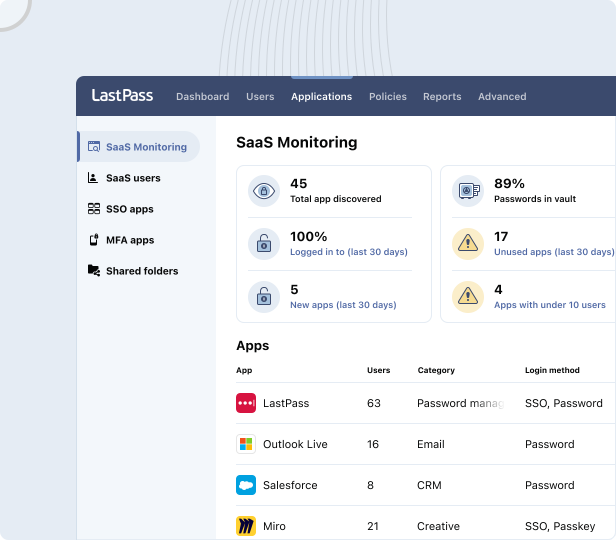
With SaaS Monitoring, which works through the browser extension, you can see which apps your employees are using, how they're logging in (SSO, vaulted password, passkey, or unvaulted password), and whether they're using personal or corporate credentials. No additional agent software required.
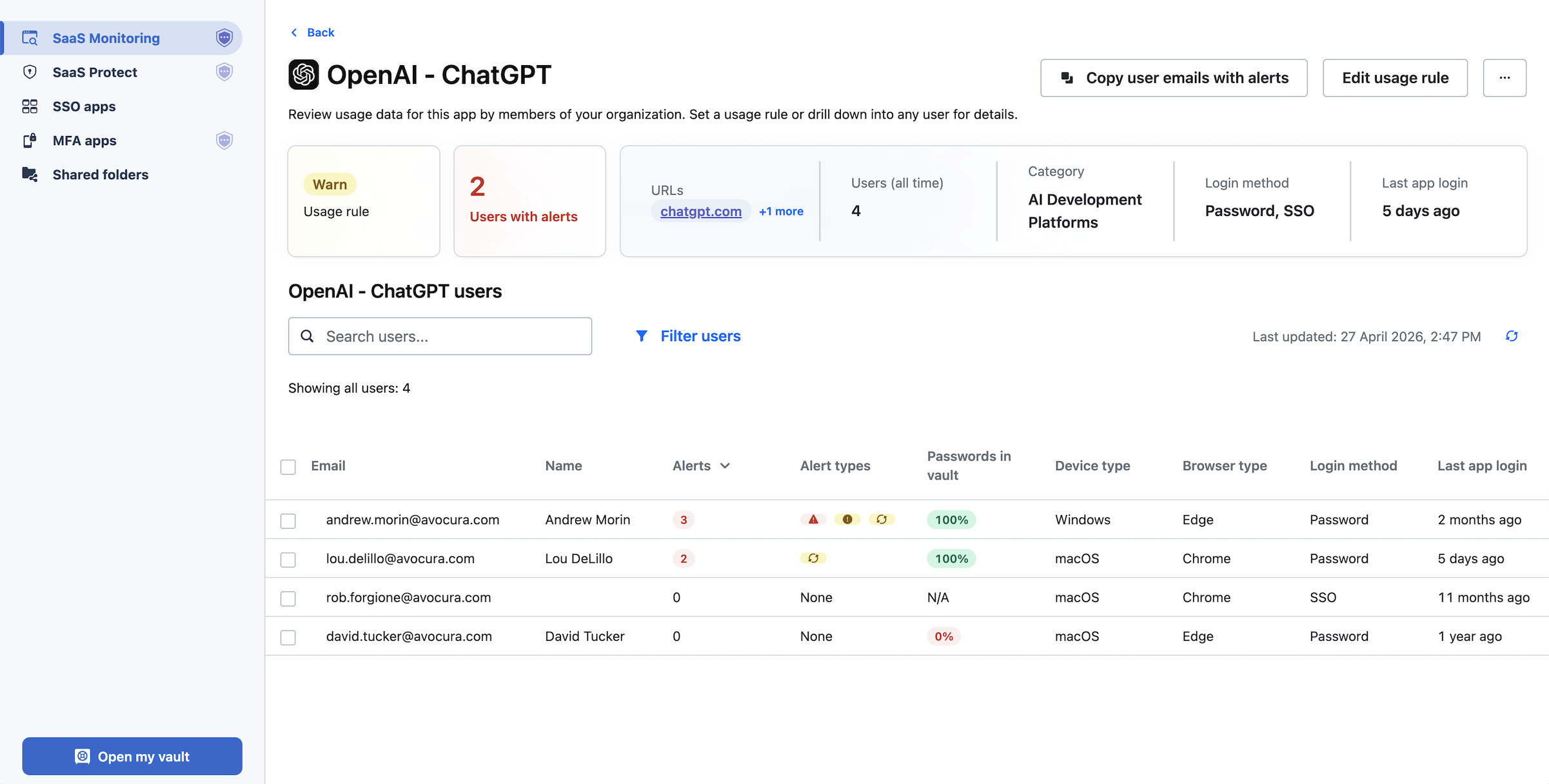
You can also drill into a specific app. Say you're looking at ChatGPT usage across your team. In the image below, you can see that four employees are using ChatGPT, two through a corporate account and two through personal emails. From here, you can decide whether to approve the AI platform as a standard tool, restrict usage for specific employees, or push everyone to the corporate account.
This level of visibility helps you limit SaaS sprawl and unintended expenses. You can see which platforms are actually being used. If one of the platforms you're paying for isn't being used regularly, you can consider canceling the subscription.
In short, one of the key differences between Dashlane and LastPass is that with LastPass you can:
-
Block unapproved applications outright. When an app is blocked, users who attempt to access it see a LastPass block screen in their browser. You can customize this to explain why the app is blocked or direct them to an approved alternative.
-
Attach warning messages that employees see when they try to log in. For example, if employees are signing into a generative AI tool like ChatGPT, you can set up a rule reminding them not to share confidential company data.
-
Add informational pop-ups. For example, if your company uses DHL as a shipping provider, you can set up a pop-up when an employee goes to UPS or FedEx, reminding them that your company has an account with DHL.

With LastPass, you can more effectively control access while still allowing your team the freedom to find new apps that help them complete their work.
As Wout Zwiep, a Process Engineer at Axxor (a global manufacturer that rolled out LastPass across three countries), put it: "People are experimenting with AI tools like OpenAI and Canva. We don't want to block innovation, but we do want to guide it safely." (Read the full case study here.)
Over 120 admin policies scoped to users and groups
Where Dashlane gives you around 16 policies applied at the organization level, LastPass gives you over 120 security policies that can be scoped to specific users or groups.
For example, you can:
-
Require MFA for your finance team when they access banking portals.
-
Enforce 16-character password minimums for IT staff while keeping it at 12 for general employees.
-
Block logins from TOR networks across your entire org.
-
Set different rules for contractors versus full-time employees.
-
Prohibit offline vault access for employees on shared computers.
When you first sign up with LastPass, we provide a recommended set of default policies to help promote secure access. From there, you can adjust based on what your team needs. If a particular group handles sensitive data, like financial records, customer information, or health data, you can enforce stricter requirements for just that group without changing the experience for everyone else.
Securely store and share credentials with whoever needs access
Your LastPass vault is where your business stores and shares credentials and other sensitive information. Your vault is encrypted, organized in folders, and accessible to your team through the browser extension and mobile apps.
Every employee gets their own vault for personal work credentials, plus access to folders that you’ve shared with them. You can create folders for social media accounts, software licenses, vendor logins, payment cards, API tokens, Wi-Fi credentials, and more, organized by team, role, or function. You can use your vault to store any other sensitive information your team needs to access but shouldn't be floating around in email or Slack.
When someone leaves the team or changes roles, you can easily revoke their access. The credentials stay in the vault; the departing employee loses access. You don't need to change every shared password each time you offboard someone.
Keeping credentials secure during offboarding was a real concern for Forsters LLP, a London law firm with over 500 employees. A period of IT team turnover meant staff were leaving and taking critical access credentials with them. As their InfoSec Manager, Neil Bell, put it: "The risk of losing access to systems when people left the firm was high." After switching to LastPass, passwords are retained in the vault regardless and there's no risk of unauthorized access. (Read the full case study here.)
Plus, every employee gets a free LastPass Families account. With a family plan, employees can store their personal credentials in the same LastPass account they use for work, so they're not toggling between apps. This further reduces your company's risk exposure: if an employee's personal email gets compromised because of a weak password, and that inbox contains anything work-related (a forwarded document, a password reset link, a shared file), that becomes a path to company data. When their personal credentials are also stored securely in LastPass, that exposure shrinks. And when the employee is offboarded, their personal passwords stay with them while company credentials are revoked.
Note: All vaults are encrypted locally with 256-bit AES. LastPass uses a zero-knowledge approach, which means we never see your master password and can't access your stored data.
An easy-to-use, secure browser extension
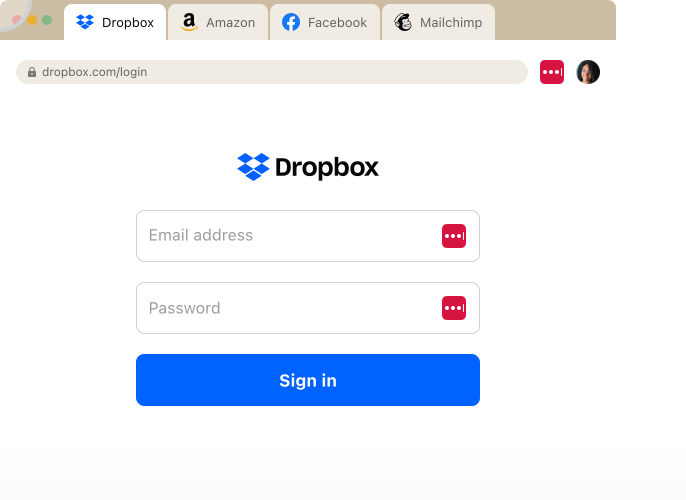
The LastPass Browser Extension autofills your passwords in one click. On desktop, LastPass can autofill MFA (TOTP) codes that you're using for extra security.
When employees log into a new site, LastPass prompts them to save the credentials. Those credentials get saved to their vault, and next time they visit the site, they can log in with one click.
When they create a new account, LastPass generates a strong, unique password right in the browser, customizable by length and complexity, which helps prevent employees from using weak passwords or reusing the same password across accounts.
Additional LastPass features
Beyond the core features above, there are several other key LastPass features that can help you onboard your team and maintain secure access across your organization.
-
A security dashboard and dark web monitoring. Your security dashboard gives you an overall security score across all enrolled users. Your dashboard breaks down who has weak passwords, who's reusing their master password, and whether any employee email addresses have appeared in known data breaches through dark web monitoring.
-
An adoption dashboard that shows license consumption, enrollment rates, and active usage. You can see who has activated their account and who hasn't, and send reminders with one click. This dashboard is especially useful when rolling out to a team that previously used Dashlane or had passwords scattered across browsers and spreadsheets.
-
SSO Compatibility. If you already use an identity provider like Okta, Microsoft Entra, or Google Workspace for SSO, LastPass works alongside it. Your employees log into SSO-supported apps through your identity provider like they always have, and LastPass covers the rest, the apps where SSO isn't supported or where adding SSO isn't worth the cost. (Many vendors charge 2 to 4x more for SSO-enabled tiers, so SSO-ing every app isn't practical for most companies.) You can also configure SSO apps directly through LastPass if you don't already have a separate identity provider, or if you want to consolidate identity and password management under one tool.
-
24/7 Support. LastPass offers 24/7 support by phone, email, or chat. Compared to Dashlane's business-hours-only availability (Monday through Friday, 9 to 6 ET), you can reach a real person at LastPass whenever you need to, whether it's a question about configuring policies or getting your team migrated.
Next steps: getting started with LastPass
One of our clients, OTO Technology, a managed service provider that deploys LastPass for its clients across France, the US, and Japan, found that onboarding sessions take under five minutes per user.
You create your account, invite your team, and your employees install the browser extension. From there, they can start saving and autofilling credentials right away. If they're already storing passwords in Dashlane, Chrome, Microsoft Edge, or other browsers, they can import those into LastPass so nothing gets left behind.
You can start your free trial or request a demo to see how LastPass can work for your team
2. Bitwarden

Bitwarden is the closest thing to an open-source business password manager. Its code is fully public and undergoes regular third-party security audits by Cure53. If inspecting the source code yourself is a requirement for your organization, Bitwarden is the only major option that lets you do that.
Unlike Dashlane, Bitwarden offers a self-hosting option for organizations that want full control over their infrastructure, plus EU and US data residency for cloud-hosted accounts. That's a meaningful upgrade from Dashlane's Dublin-only hosting for organizations with data sovereignty requirements.
But there are some areas where Bitwarden falls short for business teams:
-
Limited SaaS visibility. Bitwarden has Access Intelligence, which flags weak or reused credentials and includes a phishing blocker. But it only has visibility into applications where credentials are already stored in Bitwarden. It can't detect non-vaulted logins or show you which SaaS and AI tools employees are accessing outside the vault, and there's no way to block or restrict access to unapproved applications.
-
Fewer admin controls. Around 18 admin policies are available, slightly more than Dashlane's 16 but significantly fewer than LastPass's 120+. There's no ability to scope policies to specific users or groups.
-
No phone support. Support is email and ticket-based only, which may be a challenge for lean IT teams that need fast answers.
If your team is technical and comfortable managing the tool themselves, Bitwarden gives you a solid, transparent option at a low price point. If you're looking for more built-in admin controls, SaaS visibility, or hands-on support, Bitwarden may require more work on your end.
3. 1Password

1Password is a good Dashlane alternative if you're a larger enterprise or a technically minded team that needs developer-focused features. 1Password stands out with advanced features like: SSH key management, a CLI for secrets automation, and Travel Mode, a unique feature that lets employees hide sensitive vaults when crossing international borders.
Over the past few years, 1Password has acquired several companies to build out what they call Extended Access Management, adding capabilities like device trust, SaaS management, and access controls on top of their core password manager. The result is a broad set of features, but they come as separate add-ons, each with its own interface, which can make the overall experience feel fragmented and drive up costs beyond the base plan.
You can share credentials with people outside your organization via links, which is useful if you regularly work with contractors or external vendors.
On the admin side, 1Password offers around 25 security policies applied at the organization level, more than Dashlane's 16 but not scoped to specific users or groups like LastPass allows. Phone support is available during business hours only (9 to 5 EST), compared to LastPass's 24/7 availability.
For small to midsize businesses without dedicated IT teams, the complexity of managing multiple add-on interfaces and the higher price point may not justify the enterprise-grade capabilities. But if your organization has a dedicated security team and needs developer tooling, 1Password is worth considering.
4. Keeper

Keeper is a good Dashlane alternative if you need FedRAMP or StateRAMP certification, or if you want password management and privileged access management (PAM) from a single vendor. It's popular with government agencies and regulated industries, and it's been expanding into PAM with secrets management, privileged session management, and connection manager features.
Keeper encrypts each vault, folder, password, and file with its own unique AES-256 key. It offers granular vault access controls, so admins can set detailed permissions for who can view, edit, share, and archive items across shared folders.
Where Keeper falls short for general business teams:
-
Pricing can escalate. Multiple users have reported significant price increases at renewal, sometimes 40 to 200% higher than the first-year rate.
-
Key features are paid add-ons. Several features that other password managers include in base plans, including dark web monitoring, advanced reporting, and certain customer support tiers, are available only as paid add-ons with Keeper.
-
No SaaS or AI visibility. There's no way to see what tools employees are signing into outside the vault or control access to unapproved applications.
-
Orphaned folder risk. When folder creators leave an organization, their shared folders can become "orphaned," meaning no one retains clear ownership or management access to the credentials inside them.
If you're in a regulated industry that requires FedRAMP compliance or needs PAM capabilities alongside password management, Keeper is worth evaluating. For general small to midsize businesses, the add-on pricing model and lack of SaaS visibility may be limiting.
5. NordPass

NordPass is a good Dashlane alternative if your primary goal is to move to a cheaper tool for basic credential storage.
NordPass is from the same company that owns NordVPN. It covers core password management features (vault, autofill, password generator, credential sharing) and uses XChaCha20 encryption with Argon2id key derivation, which are newer cryptographic standards. It also includes 3GB of file storage per user and an email masking feature. If you already use NordVPN and want to bundle, NordPass lets you consolidate vendors.
Where NordPass falls short:
-
Minimal admin policies. Only 8 admin policies are available, the fewest of any competitor listed here. Sharing permissions are limited to "can view," "can edit," or "can autofill" with no multi-level folder permissions. That's even fewer than Dashlane's 16.
-
No SaaS or AI visibility. You can't see what tools employees are signing into or control access to unapproved applications.
-
No phone support. Chat and email only.
-
Data center sharing limitations. Items can only be shared between members whose accounts are in the same data center, which limits flexibility for distributed teams.
NordPass is also one of several products Nord Security maintains alongside NordVPN, NordLayer, and NordLocker, which means development resources are spread across the full product line rather than focused on password management alone.
6. Proton Pass

Proton Pass is built by the team behind Proton Mail. It's fully open-source with independently audited code and hosted on Proton's own infrastructure in Switzerland, which makes it appealing to privacy-conscious organizations that prefer a Swiss provider and want to avoid US jurisdiction, although its infrastructure is not exclusively outside the EU.
Proton Pass includes built-in hide-my-email aliases that mask your real email address when signing up for new accounts, reducing spam and phishing exposure. It also allows secure sharing with people outside the Proton ecosystem, which simplifies collaboration with contractors and external partners. Unlike Dashlane, which has discontinued its free plan, Proton Pass still offers a free version.
Proton Pass is newer to the business market, and it shows in a few areas. It lacks the depth of admin controls, SaaS Monitoring, and policy granularity that established business password managers offer. There's no way to see what tools employees are signing into outside the vault, no ability to block unapproved apps, and admin features are still being built out.
For privacy-conscious individuals or very small teams, Proton Pass is a compelling option. For SMBs that need granular admin controls, SaaS visibility, and a mature admin console, it's not there yet.
Dashlane alternatives compared at a glance
We left pricing out of this comparison because it changes frequently and can be misleading. Every vendor on this list offers multiple tiers with different feature sets, so comparing starting prices side by side suggests an apples-to-apples comparison that doesn't exist. A $4/user/month plan from one vendor may not include features that another vendor bundles into their $8/user/month plan. We recommend checking each vendor's pricing page directly for the most current rates and plan details.

Further, we've done our best to make this table accurate based on our research, but features and policies change. If something looks off, check the vendor's site for the latest information.
Choosing the right Dashlane alternative for your business
If you're looking for a Dashlane alternative, the right choice depends on what's driving the switch. In this guide, we covered options ranging from open-source and self-hosted tools to enterprise-grade platforms, budget-friendly managers, and privacy-focused alternatives. Each has its own strengths depending on your team's size, technical needs, and priorities.
But if what you need is a secure access tool that your whole team will actually adopt, one that gives you credential management, over 120 granular admin policies, SaaS visibility, and 24/7 real support without enterprise complexity or enterprise pricing, LastPass is built for that.
We use a zero-knowledge approach, meaning we never have access to your master password or your stored data. From there, you get the functionality that matters for businesses: a secure password vault, a browser extension for autofill, over 120 customizable security policies you can scope to specific teams or individuals, and SaaS Monitoring that shows you how your team is accessing the tools they use every day.