
As an MSP, you're managing the credentials, passwords, and other privileged data of several clients at once. Each client has its own environment, users, and tools. To do this effectively, you need a password manager built to help MSPs scale, and one that's easy enough for your clients to actually use.
If your clients' employees don't actually use the password manager you provide, it doesn't protect them. They keep reusing passwords, sharing credentials over Slack and email, and logging in to unvetted SaaS and AI tools, and you're accountable for the gaps that creates. These bad habits also create more operational costs for you: Password reset requests, which happen when someone forgets a login or a login has been exposed, account for up to 50% of IT help desk tickets, at an average cost of around $70 each.
And if your password manager doesn't have MSP-specific features like multi-tenant management and consolidated license management, you end up running each client through a separate login and reconciling billing by hand, which only gets harder with every client you add.
Below, we walk through the six best password managers for MSPs, starting with LastPass, and how each one handles the MSP model:
Feature information for all products reflects publicly available documentation as of June 2026.
1. LastPass

LastPass, named 2025’s MSP Today Product of the Year, gives MSPs the tools they need to let their clients maintain security and easily manage access.
With LastPass, you can:
-
Run every client from a single console, each kept separate from the rest
-
Manage licenses and billing for all your clients in one place
-
Control what each of your technicians can access, client by client
-
Onboard new clients in a few clicks instead of rebuilding each setup from scratch
-
Integrate LastPass alongside the RMM, PSA, and Microsoft 365 tools you already run
-
Hold every client to strong, consistent security standards
-
See which SaaS and AI apps a client's team is using, and act on it
Because it works through a browser extension your clients' teams already know how to use, it's straightforward to roll out: OTO Technology, an MSP deploying LastPass for clients across France, the US, and Japan, onboards users in under five minutes each. And adoption spreads quickly even through large companies. At HOLT CAT, a Caterpillar equipment dealer with 3,500+ employees, LastPass filled all 2,500 initial seats in year one and grew to 3,500 seats at 70% adoption by year two, with employees requesting access on their own.
To get a better understanding of how you can use LastPass to manage your clients, you can:
Or keep reading below, where we walk through how LastPass works for MSPs.
Managing every client from one console

As an MSP, you're running separate environments for every client you support. LastPass handles that from a single multi-tenant console.
While each client is its own isolated company account, you can manage all of them without logging in and out of separate systems. Of course, one client's vaults, users, and data are never visible from another client's account, so credentials never cross between the businesses you support.
Every managed client gets the full LastPass feature set. These are the features which make LastPass a great fit for companies that want to securely navigate the applications they use, including multi-factor authentication, single sign-on, directory integrations, federated login, and 120+ configurable policies.
The console handles the day-to-day of running multiple clients, with onboarding for new accounts, granular user details, and account statuses in one place. It's available in seven languages for MSPs working across regions.
Handling licenses and billing across clients
LastPass uses usage-based billing, so you assign licenses to each client based on what they actually need and adjust them as a client grows or shrinks. You're not locked into fixed seat counts per account. Instead, companies are always billed based on the licenses they consume.
You track licenses and SKUs across every client from one place, with billing reports that show what each client is using. That replaces the manual reconciliation that comes with billing each client account separately.
License management is flexible enough to align to your own revenue cycle, so what you bill clients can follow the same schedule as what you pay for LastPass. When a client adds staff mid-quarter, you add licenses to that tenant and the change shows up in your billing report.
Controlling what each technician can do
Not every technician needs full control of every client. LastPass lets you set the level of access each admin and engineer has, so you decide who can do what rather than giving everyone the same reach into every client account.
You control which activities each technician can perform, such as setting who can:
-
Add users
-
Set policies
-
Manage groups
-
Pull reports
Access is scoped by role, so a junior engineer can be limited to day-to-day user management while senior admins keep control over policies and configuration.
For example, you can let a help desk technician add and remove users in a client's account without also giving them the ability to change that client's security policies.
Onboarding new clients without rebuilding every time

When you bring on a new client, you don't have to configure their security setup from scratch. LastPass lets you save and reuse templates for policies, groups, and admin roles, so you apply a proven configuration to a new client instead of building each one by hand.
Our templates are customizable, so you can tailor them towards the type of clients you’re bringing on.
Standardizing onboarding this way keeps configurations consistent from client to client, which makes it easier to hold every client to the same security standards. It also helps streamline compliance with frameworks like NIST and CIS.
Keeping client data private
LastPass uses a zero-knowledge approach, which means neither LastPass nor you as the MSP can see a client's master password or the contents of their vault. All vaults are encrypted locally with 256-bit AES, so credentials are protected before they ever leave the device.
For an MSP, that protects the credentials you manage and lets you show clients their sensitive data isn't visible even to the provider managing it. LastPass has also been audited against a range of independent security and privacy standards, which matters when your clients have their own compliance requirements to meet:
-
SOC 2 Type II: Independent audit verifying that LastPass's security controls are designed correctly and operating effectively over a sustained period.
-
ISO 27001: International standard for information security management systems, covering how an organization manages risk, protects data, and maintains security controls.
-
SOC 3: A public summary of the SOC 2 Type II audit results, shareable without the confidentiality restrictions of the full SOC 2 report.
-
BSI C5: A security catalog published by the German government for evaluating cloud service providers, used by European businesses with strict regulatory requirements.
-
IRAP (Protected): An Australian government framework for assessing security controls, used by Australian federal, state, and local agencies.
-
TRUSTe: Independent privacy certification verifying that LastPass's privacy practices meet established standards.
Seeing how client teams access work
Employees sign up for SaaS and AI tools on their own, often without checking with anyone in IT. In fact, 55% of organizations say employees adopt SaaS tools without checking with IT first, and 56% report sensitive data being uploaded to unvetted applications. Every one of those unvetted tools is a place a client's data can go that you have no record of. As an MSP, you can better provide value to your clients by helping them see which tools their team is using, and also setting up restrictions when the client asks for it.
LastPass has two features that help with this:
-
SaaS Monitoring
-
SaaS Protect
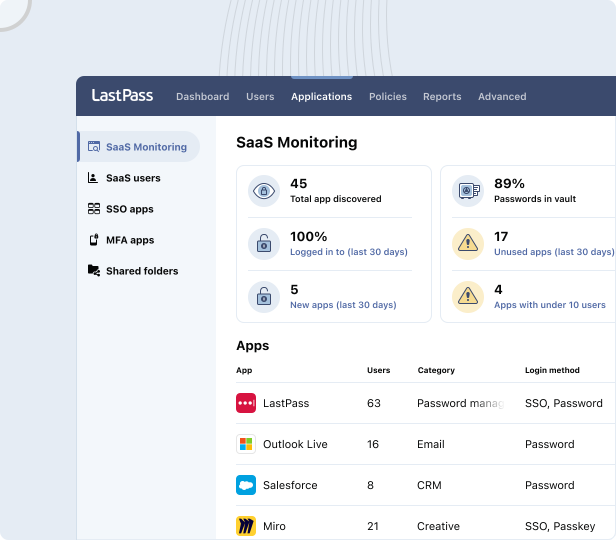
With SaaS Monitoring, you can see which applications a client's employees are using, how they're logging in (SSO, vaulted password, passkey, or unvaulted password), and whether they're using corporate or personal credentials. It works through the same browser extension your clients already use for autofill, so there's nothing extra to deploy.
For example, in the image below you can see that four of a client's employees are using ChatGPT. Two with corporate accounts and two with personal ones. You can see whether they created passwords or used Google SSO, and when they last logged in. From there, you can decide whether to approve it as a standard tool, restrict it, or push everyone to the corporate account.

SaaS Protect is how you act on what SaaS Monitoring shows you. You can block an unapproved app outright, and anyone who tries to open it sees a LastPass block screen you can customize to explain why or point them to an approved alternative. You can attach a warning that appears when an employee signs into an app, like a reminder not to share confidential data with a generative-AI tool. Or you can add an informational pop-up that points them to a tool the client already uses, such as steering someone who opens a new file-sharing app back to the client's existing one.

The Security Dashboard covers the credentials themselves. It gives you a client's overall security score and flags weak, reused, or breached passwords, with dark web monitoring that surfaces credentials found in known data leaks. Each client's security score also appears in the MSP console's company list, so you can see which clients need attention at a glance.
Reporting results back to each client
Part of an MSPs job is showing clients they're getting value for what they pay. LastPass generates a client-facing report, the Executive Summary, for each managed company.
The report pulls together three areas:
-
Adoption. This is how many licenses the client is using, and the enrollment rate (how many invited users have activated their accounts).
-
Security. This is your client's average security score, the share of users with a strong master password and with MFA enabled, counts of weak or reused master passwords, and any unresolved dark web monitoring alerts.
-
Usage. This is your client’s active usage rate, how many site logins LastPass handled in the last 30 days, estimated hours saved by autofill, and which shared folders are in use.

You generate the report for one client or all managed companies at once, choose the language, and have it delivered to your inbox. You can also turn on monthly delivery, which sends the summary to selected contacts at each client as a PDF automatically.
This is the report you bring to a client review. It puts enrollment, security posture, and time saved over the last month into one summary you can hand the client directly.
Want to see the multi-tenant console for yourself? You can start a free 30-day LastPass MSP trial.
2. 1Password Enterprise Password Manager – MSP Edition
1Password offers a dedicated MSP, called the Enterprise Password Manager – MSP Edition. It's the same password manager 1Password sells to businesses, with an MSP console and consumption-based billing added for managing multiple clients.
You manage clients from a single MSP console, configuring accounts, opening client instances, and monitoring client usage without separate logins. You can add new clients or link existing 1Password client accounts, and each client instance opens in its own tab, so a technician moves between a client's account and the MSP account with a click.
Technician access is scoped through groups and permissions, so each technician gets only the access their support role requires. When a technician performs administrative actions on a client account, 1Password requires them to periodically re-verify their identity through multi-factor authentication, and it records technician actions in an activity log for auditing against compliance standards.
Billing is consumption-based with no license minimums. Managed client invoices consolidate into one invoice per billing period, with CSV export and a view of each client's seat usage and estimated usage for the upcoming period.
On security, 1Password uses a zero-knowledge, dual-key encryption model: clients own their data, and 1Password can't see vault names, vault items, or account passwords. It integrates with clients' existing SSO providers and SIEM platforms.
Two specifics on how it lines up with the criteria above:
-
Provisioning: MSPs provision 1Password Business plans for clients; 1Password says other plans aren't available to provision yet.
-
SaaS visibility: Not part of the MSP Edition. 1Password's SaaS discovery and monitoring is a separate product, SaaS Manager, sold under its Extended Access Management line.
View 1Password's MSP Edition pricing
3. Bitwarden
Bitwarden is an open-source password manager with a dedicated MSP offering. MSPs can work with it in three ways: use it internally, offer it as a managed service they sell and run on clients' behalf, or resell it to clients who administer it themselves.
Client management runs through the Bitwarden Provider Portal, where an MSP centrally manages client Bitwarden organizations and their billing from one place. As your client base grows, Bitwarden offers tiered discounting, along with client enablement materials, a dedicated account manager, and monthly MSP admin training sessions to help onboard clients.
For policies and oversight, you can enforce security policies across client organizations and monitor activity through event logs. Bitwarden has around 18 enterprise policies, enforced across all members at the organization level rather than scoped to individual users or groups, though vault access itself is managed granularly through collections and groups with per-group permissions. Business-tier features include Directory Sync, SSO integration (included at no additional cost), Vault Health Reports, and a sharing model for managing who can access what.
On security, Bitwarden uses zero-knowledge, end-to-end encryption, and its code is open source and audited by third-party security firms. Self-hosting is included in the enterprise subscription at no additional cost.
On visibility: Bitwarden's Access Intelligence (Enterprise plans) is credential-focused. Its Risk Insights surfaces weak, reused, or exposed credentials stored across a client's applications and drives guided remediation, and an Advanced Phishing Blocker redirects users away from known phishing sites. That visibility is built around credentials stored in Bitwarden rather than browser-based discovery of the non-vaulted or unsanctioned SaaS and AI apps a client's team is using, and aside from the phishing blocker it doesn't include controls to block or restrict access to unapproved apps.
4. Keeper
Keeper offers a dedicated MSP product, KeeperMSP, for managing password security across client companies, built on a zero-trust, zero-knowledge architecture. For MSPs that need privileged access management, Keeper also offers a separate MSP product, Privileged Access Manager for MSPs.
Each managed company's employees get a private, encrypted vault for their passwords, credentials, and files. You administer clients through role-based access control and delegated admin, with reporting and auditing tools that give you visibility into end users' password habits. KeeperMSP supports MFA and SIEM event reporting, and maps to compliance standards including HIPAA, GDPR, and others.
Keeper supports granular, controlled sharing of credentials and secrets among employees, teams, and external contractors, and includes dark web monitoring through BreachWatch, which scans for compromised credentials and alerts admins.
Several capabilities an MSP would use for reporting and compliance are paid add-ons rather than included, such as Compliance Reporting, Advanced Reporting & Alerts (100+ event types with SIEM integration), Secure File Storage, and BreachWatch dark web monitoring. On pricing, while Keeper's initial pricing is competitive, multiple users have reported significant increases at renewal, sometimes 40–200% higher than the first-year rate.
On visibility: Keeper's password-security visibility centers on credential health, end-user password habits, and dark web monitoring through BreachWatch. Neither Keeper's MSP materials nor a search surfaced browser-based discovery of which SaaS and AI apps a client's team is logging into, or controls to block or restrict access to unapproved apps
5. CyberFOX (Password Boss)
Password Boss, now part of CyberFOX, is a password manager built specifically for MSPs. It was originally developed by an MSP operator for MSP workflows. CyberFOX also offers a separate privileged access management product, AutoElevate, for MSPs that want privilege-elevation and least-privilege controls alongside password management.
You manage clients from a centralized multi-tenant portal, reaching every client, user, and device from one console and adding new clients without separate logins. Deployment runs through an MSP's RMM platform and can be scripted, so a new client can go live the same day rather than through a long rollout.
It integrates with the MSP stack — RMM and PSA platforms including ConnectWise, Datto, and Kaseya — and offers direct login into remote-control tools like ConnectWise Control, TeamViewer, Splashtop, and LogMeIn.
Technician access is role-based: you assign roles that control which team members can set up, manage, and access a client's passwords. Credential sharing is encrypted and lets your team share access without exposing the underlying password.
On security, Password Boss uses zero-knowledge, end-to-end encryption, with a remote-delete function that wipes encrypted data from a lost or stolen device. For oversight, it provides real-time audit logs, dark web monitoring, and Customer Health Reports an MSP can use in client reviews.
On visibility: Password Boss's oversight centers on audit logs, dark web monitoring, and credential-health reporting. Its materials don't describe browser-based discovery of which SaaS and AI apps a client's team is using, or controls to block or restrict access to unapproved apps.
6. ManageEngine (Password Manager Pro)
ManageEngine offers an MSP product through Password Manager Pro – MSP Edition. Its focus is privileged password management: it's built to secure the privileged and shared administrator credentials MSPs use to manage client IT infrastructure rather than everyday employee app logins. For MSPs that want a fuller privileged access platform, ManageEngine also offers PAM360 MSP Edition.
You manage multiple clients from a single instance, with each client's data kept segregated, and administer access through predefined user roles (Administrator, Password Administrator, Privileged Administrator, Password Auditor, and Password User). It imports users and groups from Active Directory or LDAP.
For credential automation, Password Manager Pro can reset passwords on remote systems on demand or on a schedule across a range of target systems, databases, and network devices, and offers request-and-release controls and time-limited access for retrieving privileged passwords. Higher editions add auto-discovery of privileged accounts, SIEM integration, ticketing-system integration, and out-of-the-box compliance reports.
Passwords are stored in a centralized, AES-256 encrypted vault, and it keeps detailed audit trails of privileged activity.
On visibility: Password Manager Pro centers on privileged-account activity and audit trails. Its materials don't describe browser-based discovery of which SaaS and AI apps a client's team is using, or controls to block or restrict access to unapproved apps.
Final thoughts: choosing a password manager for MSPs
For an MSP, the right password manager has to do two jobs at once. It has to scale across every client you manage, and it has to be easy enough that your clients' teams actually use it. Miss either one and the problems show up quickly.
Without MSP-specific features like multi-tenant management and consolidated license management, you end up running each client through a separate login and reconciling billing by hand, and that work grows with every client you take on. And if a client's team doesn't adopt the tool, it doesn't protect them: people fall back on reused passwords, credentials shared over Slack and email, and unvetted SaaS and AI tools, leaving security gaps you're accountable for and adding to your help desk load.
Most of the tools covered here handle parts of this well, but they tend to leave gaps where it counts for an MSP. Policies that can't be scoped per client. Visibility that stops at the credentials already in the vault. Features that only arrive as paid add-ons. Or a privileged-access focus that doesn't cover the everyday employee logins most of a client's team actually uses.
LastPass covers both jobs from one console. You manage and bill every client from a single place, scope what each technician can do, see which SaaS and AI apps a client's team is using, and report the results back to clients. And because it runs through a browser extension your clients' teams already know how to use, it's straightforward to roll out and to keep people using, which is the part most tools get wrong.
If you want to see how it works across your own client accounts, you can start a free 30-day LastPass MSP trial.


