

- Click on “Change Password” to be taken to the website, where you can log in and go to the account settings.
- Find the option to change the password and use the LastPass password generator to create a new, random password.
- When you save the changes on the website, LastPass will automatically ask if you want to save the updated password to your vault, too.
Even though data breaches continue to happen with alarming frequency, LastPass dark web monitoring can help you be proactive when your personal information is compromised. By staying vigilant and updating your passwords, you can reduce your risk of being a victim of cybercrime and identity theft.
Why should you take action after a dark web alert?
Ever wonder what happens to the sensitive information stolen in a data breach? If cybercriminals can profit off the data, it often ends up for sale on the dark web. The dark web is a “hidden” Internet, meaning it’s not indexed by search engines like Google and requires special software to access, like the Tor browser. Not everything on the dark web is illegal, but it’s often used by cybercriminals to sell stolen credit cards, passwords, phone numbers, social security numbers, and more.
According to privacy advocacy group Privacy Rights Clearinghouse, at least 11.6 billion records have been breached since 2005. That number continues to grow as more companies are breached every year – putting your personal information at risk of being sold on the dark web. From identity theft to taking over your Netflix to draining your checking account, stolen data sold on the dark web can wreak havoc on your life.
How to enable dark web alerts
With the frequency of data breaches, it’s important to know if your personal information has been jeopardized. But most of us don’t have the skill – or the time – to constantly search the dark web to see if our data is at risk. Enabling dark web monitoring in LastPass saves you time and worry by keeping an eye out for your stolen credentials. Dark web monitoring is currently available to LastPass Premium, Families and business customers.
To enable dark web alerts, launch your LastPass Vault and click the Security Dashboard option in the left-hand menu. In the Dark Web Monitoring section of the dashboard, click “start monitoring” and complete the steps to turn on the alerts.
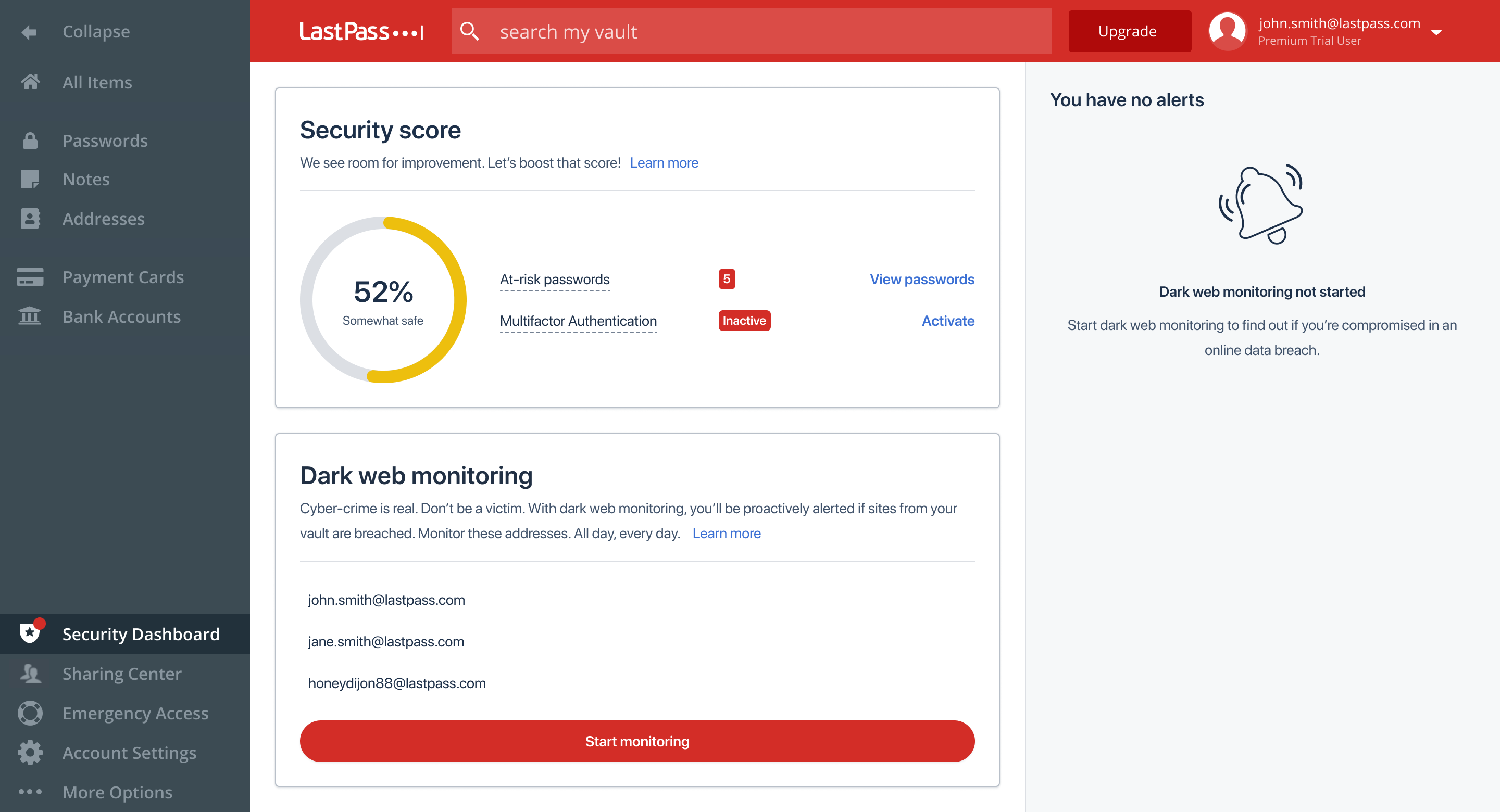 By enabling dark web monitoring in the Security Dashboard, LastPass does a dark web scan and monitors your email addresses continuously in a database of breached credentials. If your information appears to be compromised, you immediately receive an email alert. In the vault, you’ll also see an alert next to the Security Dashboard menu item.
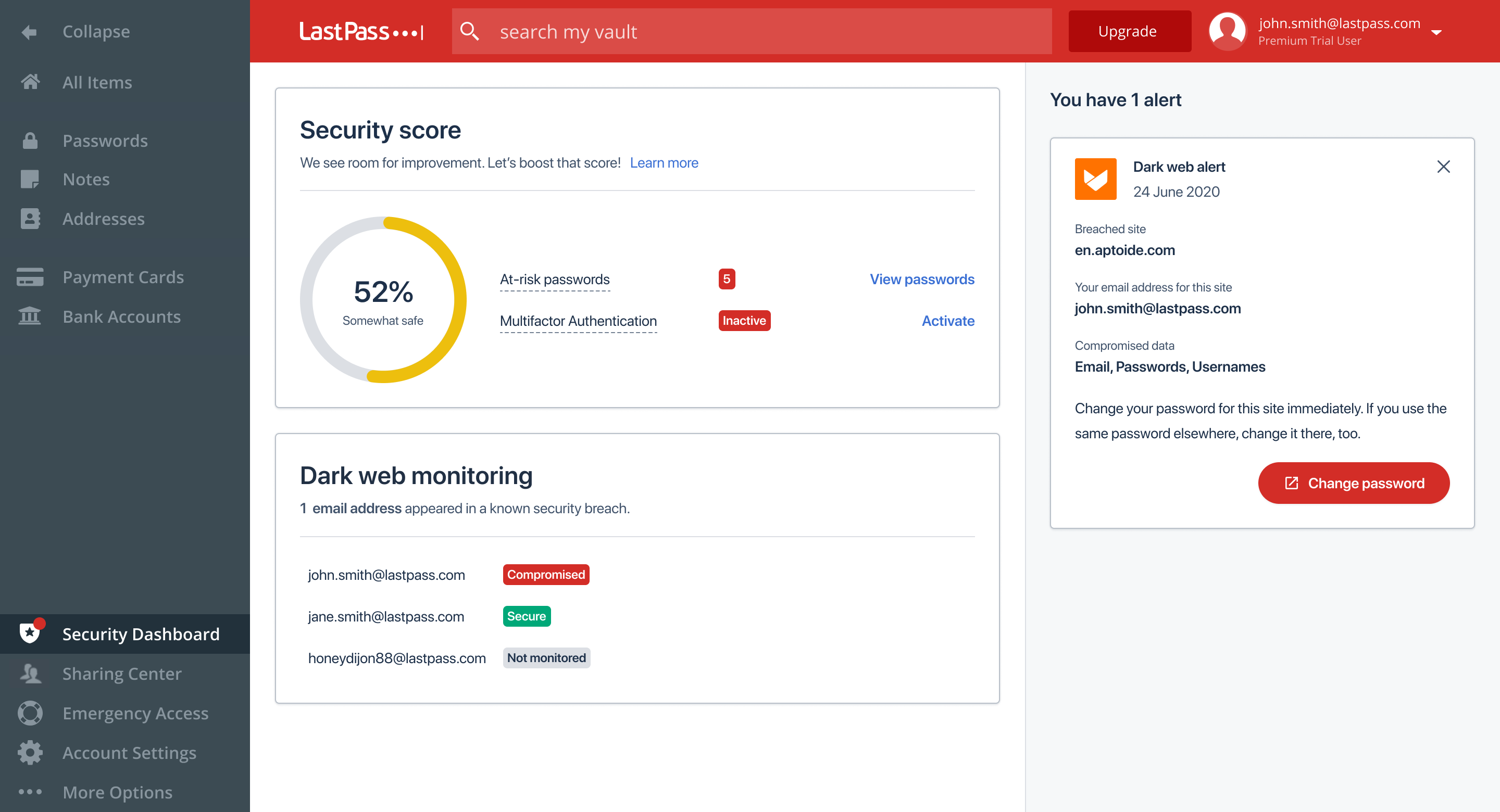 You’ll see either a “Secure” or “Compromised” status next to each email address, and more details of the alert will show to the right. You’ll see which website was breached and what information was leaked, so you know what to do next.
Now you can rest assured knowing that LastPass is protecting your digital security – even when you aren’t logged in.
You’ll see either a “Secure” or “Compromised” status next to each email address, and more details of the alert will show to the right. You’ll see which website was breached and what information was leaked, so you know what to do next.
Now you can rest assured knowing that LastPass is protecting your digital security – even when you aren’t logged in.
Last summer we announced passwordless login to the LastPass vault through the LastPass Authenticator for individuals and businesses, followed by passwordless login on mobile using biometrics. Today, our journey to passwordless continues with FIDO2 compatible authenticators as additional options to passwordlessly login to the LastPass vault on desktop.
- New to LastPass? Sign up today (it’s easy!) and try passwordless for free. password generator the blog article component, like the current callout card and button options
- Long-time LastPass user but new to passwordless? Experience password-free login.
- Want your business to go passwordless? Try it for yourself, then enable it for your employees. And yes, with a new policy, you’ll be able to control which FIDO2 authenticators employees can use!
Last summer we announced passwordless login to the LastPass vault through the LastPass Authenticator for individuals and businesses, followed by passwordless login on mobile using biometrics. Today, our journey to passwordless continues with FIDO2 compatible authenticators as additional options to passwordlessly login to the LastPass vault on desktop.
- New to LastPass? Sign up today (it’s easy!) and try passwordless for free.
- Long-time LastPass user but new to passwordless? Experience password-free login.password generator the blog article component, like the current callout card and button options
- Want your business to go passwordless? Try it for yourself, then enable it for your employees. And yes, with a new policy, you’ll be able to control which FIDO2 authenticators employees can use!
Last summer we announced passwordless login to the LastPass vault through the LastPass Authenticator for individuals and businesses, followed by passwordless login on mobile using biometrics. Today, our journey to passwordless continues with FIDO2 compatible authenticators as additional options to passwordlessly login to the LastPass vault on desktop.
- New to LastPass? Sign up today (it’s easy!) and try passwordless for free.
- Long-time LastPass user but new to passwordless? Experience password-free login.password generator the blog article component, like the current callout card and button options
- Want your business to go passwordless? Try it for yourself, then enable it for your employees. And yes, with a new policy, you’ll be able to control which FIDO2 authenticators employees can use!
Last summer we announced passwordless login to the LastPass vault through the LastPass Authenticator for individuals and businesses, followed by passwordless login on mobile using biometrics. Today, our journey to passwordless continues with FIDO2 compatible authenticators as additional options to passwordlessly login to the LastPass vault on desktop.
- New to LastPass? Sign up today (it’s easy!) and try passwordless for free. password generator the blog article component, like the current callout card and button options
- Long-time LastPass user but new to passwordless? Experience password-free login.
- Want your business to go passwordless? Try it for yourself, then enable it for your employees. And yes, with a new policy, you’ll be able to control which FIDO2 authenticators employees can use!
Last summer we announced passwordless login to the LastPass vault through the LastPass Authenticator for individuals and businesses, followed by passwordless login on mobile using biometrics. Today, our journey to passwordless continues with FIDO2 compatible authenticators as additional options to passwordlessly login to the LastPass vault on desktop.
- New to LastPass? Sign up today (it’s easy!) and try passwordless for free.
- Long-time LastPass user but new to passwordless? Experience password-free login. password generator the blog article component, like the current callout card and button options
- Want your business to go passwordless? Try it for yourself, then enable it for your employees. And yes, with a new policy, you’ll be able to control which FIDO2 authenticators employees can use!
Last summer we announced passwordless login to the LastPass vault through the LastPass Authenticator for individuals and businesses, followed by passwordless login on mobile using biometrics. Today, our journey to passwordless continues with FIDO2 compatible authenticators as additional options to passwordlessly login to the LastPass vault on desktop.
- New to LastPass? Sign up today (it’s easy!) and try passwordless for free. password generator the blog article component, like the current callout card and button options
- Long-time LastPass user but new to passwordless? Experience password-free login.
- Want your business to go passwordless? Try it for yourself, then enable it for your employees. And yes, with a new policy, you’ll be able to control which FIDO2 authenticators employees can use!
 Quote text: Lorem ipsum dolor sit amet, consectetur adipiscing elit. Quisque at arcu at nisi molestie fringilla. Phasellus porta ante eu commodo ullamcorper. Aliquam ante odio, tristique sit amet rutrum nec, luctus eget dui.Quote text: Lorem ipsum dolor sit amet, consectetur adipiscing elit. Quisque at arcu at nisi molestie fringilla. Phasellus porta ante eu commodo ullamcorper. Aliquam ante odio, tristique sit amet rutrum nec, luctus eget dui.


