
HIPAA (the Health Insurance Portability and Accountability Act) requires healthcare organizations to protect how their teams access, store, and share protected health information (PHI). But often in healthcare organizations, employees are doing things every day that put HIPAA compliance at risk. This includes sharing electronic health record (EHR) logins over email or Slack, reusing the same password across clinical and billing systems, saving credentials in browsers on shared workstations, signing up for new tools without checking with IT, and pasting patient information into AI tools like ChatGPT to look up a diagnosis code.
These behaviors can lead to HIPAA violations, with fines that can reach tens of thousands per violation and millions annually. Plus, these violations can lead to a breach of trust with patients and practitioners.
To solve these issues, healthcare companies will often look for a HIPAA compliant password manager, but while many password managers claim to be "HIPAA compliant," there are two things to be aware of:
- No password manager is HIPAA compliant on its own. Compliance depends both on whether the tool has the right capabilities and how it's configured and used in your organization. If you choose the right tool but don't enforce the right policies — or your team doesn't adopt the tool because it's too complex — you're still leaving your organization exposed.
- A password manager is just one aspect of HIPAA compliance. Storing and sharing credentials securely matters, but so does knowing what SaaS and AI tools your team is accessing, how they're logging in, and whether they're using personal or corporate accounts.
In this post, we'll break down what HIPAA actually requires for password management, and compare six options that offer capabilities beyond basic credential storage:
Note: We include our platform, LastPass, which offers over 120 security policies, lets you know which tools your team is accessing and where HIPAA risks may be hiding, and a zero-knowledge approach designed to support healthcare companies that need enterprise-grade protection without enterprise complexity.
What HIPAA actually requires for password management
To be clear, HIPAA doesn't mention password managers. The Security Rule (45 CFR Part 164)sets standards for how covered entities and business associates protect electronic protected health information (ePHI), but it's technology-neutral — it doesn't prescribe specific software, encryption standards, or password lengths. Compliance is determined by how you configure and use your tools, not by the tools themselves.
That said, several provisions within the Security Rule and common interpretations can directly relate to how your team creates, stores, and uses passwords:
- Unique user identification (§164.312(a)(2)(i), Required): Every person who accesses ePHI must have their own unique login. Shared accounts — like a single EHR login passed around the front desk — can violate this requirement.
- Emergency access procedures (§164.312(a)(2)(ii), Required): You need a documented way to access ePHI in an emergency, even if the person who normally manages access is unavailable.
- Audit controls (§164.312(b), Required): You need mechanisms that record and examine activity in systems that contain ePHI. This includes logging authentication attempts, password changes, and access events.
- Person or entity authentication (§164.312(d), Required): You must verify that anyone seeking access to ePHI is who they claim to be — which is often implemented using MFA.
- Password management procedures (§164.308(a)(5)(ii)(D), Addressable): You need written procedures for creating, changing, and safeguarding passwords.
- Automatic logoff (§164.312(a)(2)(iii), Addressable): Systems that access ePHI should terminate sessions after a period of inactivity — especially important on shared workstations in clinical settings.
When you see a provision marked as "addressable,” that doesn't mean it’s optional. Rather, it means that you must either implement the specification or document why an alternative measure is equally effective in your environment. In both cases, your decision must be documented in writing. An auditor will look at factors including your risk analysis, your risk mitigation strategy, what security measures you already have in place, and the cost of implementation. If you choose not to implement the specification as written, you need documentation showing what you considered, why it wasn't reasonable in your environment, and how your alternative achieves the same goal.
How to evaluate password managers to enableHIPAA compliance
Because HIPAA is technology-neutral, no password manager is inherently "HIPAA compliant.” A tool can support compliance by giving you the right capabilities, but it's your policies, configuration, and enforcement that make your organization compliant.
So when evaluating a password manager for a HIPAA-regulated environment, the question isn't "is this tool HIPAA compliant?" The question is whether it gives you what you need to meet these requirements:
- Encryption: AES-256 (or equivalent) encryption at rest and in transit, to help protect stored credentials even if your systems are compromised.
- Granular policy enforcement: The ability to set security policies by user role or group — for example, different password complexity rules for clinical staff who access EHR systems versus administrative staff, or requiring MFA for anyone accessing billing portals.
- Audit logs and reporting: Detailed logs of authentication events, password changes, and access activity that you can pull during a HIPAA audit.
- MFA enforcement and automatic logoff: The ability to require multi-factor authentication and configure session timeouts, especially for shared workstations.
- Visibility into SaaS and AI tool usage: The Security Rule requires you to protect ePHI from unauthorized access — but you can't protect data in systems you don't know about. Knowing what applications your employees are accessing and how they're logging in, particularly when staff sign up for tools without IT approval, helps you identify where PHI could end up before it becomes a compliance issue.
- Ease of deployment: For healthcare SMBs without dedicated IT teams, the tool needs to be simple enough that your team will actually adopt it. A tool that goes unused doesn't help your compliance posture.
- Support availability:Healthcare operates around the clock. If a clinician gets locked out at 2 AM, you need to reach someone — not wait for business hours.
- Offboarding controls: When staff leave, you need to revoke their access to credentials immediately, without resetting every shared password across the team.
Do you need a Business Associate Agreement (BAA) with your password manager?
If your organization is a covered entity or business associate under HIPAA, any vendor that creates, receives, maintains, or transmits ePHI on your behalf is considered a business associate and you're required to have a signed BAA in place before sharing that data.
Password managers are designed so that this situation doesn't arise. Tools like LastPass, Bitwarden, Keeper, and others on this list use zero-knowledge architecture, meaning your data is encrypted locally before it reaches their servers and the vendor never holds the decryption key. The vendor cannot access, read, or process what's stored in your vault. Because of this, most password managers do not sign BAAs. The architecture is specifically built so that the vendor never has access to your data in any form.
The HHS Office for Civil Rights has taken a broad view of what constitutes a business associate, stating that cloud service providers storing ePHI can meet the definition even if the data is encrypted and the provider cannot view it. This interpretation is worth being aware of, but in practice it applies to the scenario where PHI actually enters the system. A password manager vault is designed to store credentials — usernames, passwords, MFA seeds — not patient records or clinical data.
The practical step for healthcare organizations is to implement a clear policy prohibiting the storage of any PHI in your password manager and document that policy for auditors. If no PHI enters the vault, the BAA question doesn't apply. This is the approach most healthcare organizations take, and it aligns with how these tools are designed to be used.
Regardless of where you land on this question, the technical safeguards still matter. Encryption, access controls, audit logging, and MFA enforcement need to meet Security Rule standards whether or not a BAA is in place.
6 Password managers to help you remain HIPAA compliant
1. LastPass: a password manager that can help keep your company HIPAA compliant

LastPass offers a safe and user-friendly password manager for healthcare businesses, with advanced secure access features that are normally only found in more complex enterprise tools.
With LastPass, you can:
- Discover which SaaS and AI tools your team is using. When your team uses the LastPass browser extension, you can gain visibility about which sites they're logging into and how they're logging in — such as whether they're using personal or corporate accounts. From there, you can configure policies to allow or block specific apps or add a custom pop-up that appears when an employee visits a specific site.
- Control access for everyone by setting over 120 admin policies that determine who can access what and how they must log in. These policies can be scoped to individuals or groups. For example, your billing team can have different requirements than your front-desk staff, or you can require multi-factor authentication for anyone accessing EHR or patient payment systems.
- Simplify secure access by giving your team an encrypted vault for storing and sharing passwords and credentials. Your team will use a browser extension that autofills passwords and MFA codes, so logging in takes a single click. You can customize sharing permissions on each folder, so credentials are only visible to the people who need them.
But these features only support your HIPAA compliance if your team actually uses them. To make it easier for your team to be compliant, LastPass works from the browser. In many cases, you can deploy it across your practice in an afternoon, no device agents or VPNs required. We include recommended default policies so you're not configuring everything from scratch, and 24/7 support by phone, email, or chat if you need help along the way. Once your team is set up, you can track who's activated their account, who's actively using the tool, and who hasn't logged in recently.
You can learn more about how to use LastPass to help keep your company HIPAA compliant by signing up for a demo, starting your free trial, or reading below.
SaaS Monitoring and SaaS Protect: addressing Shadow IT in healthcare
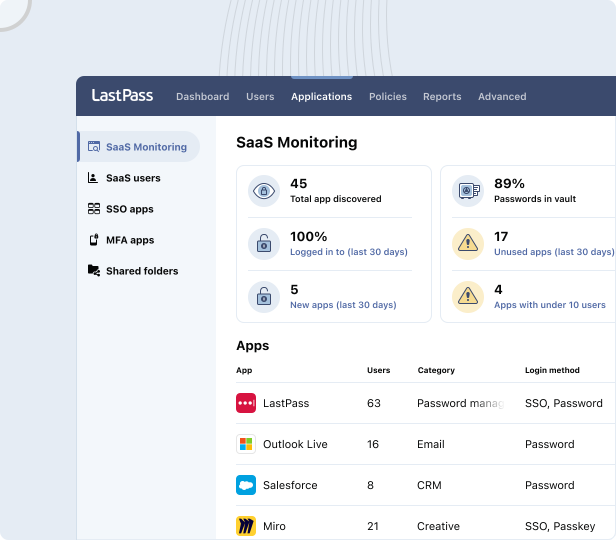
59% of organizations say employees adopt AI tools and SaaS apps without first checking with IT. In healthcare, this may present a direct HIPAA compliance risk. If an employee pastes patient information into an unvetted AI tool or signs up for a scheduling platform using their work email, you have PHI flowing to a system no one approved and no one is monitoring.
With SaaS Monitoring, you can see what apps and AI tools your employees are signing into, and how they're logging in, such as whether they're using personal or corporate accounts.
SaaS Protect lets you act on what you find. You can block unapproved applications outright, attach a warning message that appears when an employee tries to log in — for example, "Do not upload patient data to this tool" — or approve vetted applications so your team knows what's safe to use.

This is especially relevant for healthcare organizations where employees are increasingly using AI tools for tasks like looking up diagnosis codes, summarizing clinical notes, or checking drug interactions. You don't necessarily want to block those tools entirely — but you need to know they're being used and guide how your team interacts with them.
While the HIPAA Security Rule doesn't name shadow IT specifically, its requirements to protect ePHI from unauthorized access and to maintain audit controls (§164.312(b)) extend to any system where PHI could end up, and that includes tools your team is using that you don't know about.
Security dashboard and dark web monitoring for ongoing risk assessment
Your security dashboard brings all of the above together with your credential health in one view. This is key for healthcare companies to help support ongoing risk assessments under HIPAA — you need to know if employee credentials are weak, reused, or already compromised.
Your dashboard flags weak or reused credentials, identifies employee email addresses that have appeared in known data breaches through dark web monitoring, and shows which SaaS and AI apps your team is logging into and where employees may be creating risk. It also gives you an overall security score across all enrolled users.
You get this visibility without ever seeing actual passwords. You can see that three people on your clinical team have weak credentials and need to update them, but the passwords themselves stay hidden.
In a healthcare context, dark web monitoring is especially important. If an employee's email address appears in a breach and that email is tied to EHR or billing system access, that's a direct path to PHI. Catching it early lets you act before it becomes an incident.
Over 120 Security Policies — scoped to users and groups that handle PHI
HIPAA requires role-based access controls, and healthcare organizations have varied risk profiles across departments. The person at the front desk scheduling appointments has a different risk profile than the billing coordinator for processing insurance claims or the clinician accessing EHR systems.

With LastPass, you can set over 120 admin policies and scope each one to specific users or groups. For example, you can:
- Require MFA for your billing team when they access patient payment portals — which can support implementation of technical requirements for HIPAA's person or entity authentication requirement (§164.312(d)).
- Enforce a minimum password length of 16 characters for staff accessing EHR systems while keeping it at 12 for general administrative staff — helping you meet password management procedures (§164.308(a)(5)(ii)(D)).
- Set different rules for contractors versus full-time clinicians.
- Block logins from TOR networks or jailbroken devices across the entire organization.
- Configure vault timeout policies so that after a period of inactivity, the vault locks and re-authentication is required — supporting automatic logoff (§164.312(a)(2)(iii)).
This means your front-desk staff doesn't face the same restrictions as your clinical team handling PHI and your clinical team gets the protection they need without policies that slow them down.
Audit logs and reports for HIPAA compliance readiness
HIPAA's audit controls requirement (§164.312(b)) calls for mechanisms that record and examine activity in systems that contain ePHI. LastPass gives you audit logs and usage reports that track app usage, policy enforcement, and user activity.

Whether you're preparing for a HIPAA audit or responding to a security incident, you'll have the documentation to demonstrate that your organization has controls in place and is actively monitoring compliance.
The Vault: Secure storage and controlled sharing of healthcare credentials

Your LastPass vault is where your practice stores and shares credentials and other sensitive information. It's organized in folders, accessible through the browser extension and mobile apps, and encrypted locally using 256-bit AES encryption before it ever reaches our servers.
LastPass uses a zero-knowledge approach, meaning we never have access to your master password or your stored vault data. Your stored credentials are protected because your encrypted data is unreadable without the decryption key, which only you hold. This can directly support HIPAA's technical safeguard requirements for encryption and access controls under §164.312(a)(1).
You can create shared folders for EHR logins, lab system credentials, insurance portal access, software licenses, and more — each customizable and easy to identify. As an admin, you control who gets access to each folder. When someone leaves the practice or changes roles, you revoke their access from the Sharing Center. The credentials stay in the vault; the person loses access. You don't need to reset every shared password each time you offboard an employee.
Every employee gets their own unique vault and login, which can directly support HIPAA's unique user identification requirement (§164.312(a)(2)(i)). And the ability to revoke access immediately at offboarding supports the Security Rule's workforce security provisions.
Plus, your employees can each get a free LastPass Families account for personal use. This strengthens your organization's security posture, because if an employee's personal email is compromised and contains anything work-related, that's a path to PHI. When their personal credentials are also stored securely, that exposure shrinks.
Healthcare case study: How a traveling healthcare company uses LastPass to stay compliant
A traveling healthcare company with about 100 employees had been managing shared credentials through a spreadsheet. The method was insecure, often outdated, and gave them no visibility into who had access to what — a problem for any business, but especially for a healthcare organization audited by the Joint Commission (JCAHO).
After switching to LastPass, they were able to secure shared credentials in one place, track which employees had access to which information, and quickly add or remove access as staff joined or left. With a remote workforce of traveling nurses connecting to centralized data, they also needed secure access from any location — something the browser extension and vault handle without requiring device agents or VPNs.
As their IT Coordinator put it: "LastPass allows our employees to seamlessly and securely access their information from any location. Whether in a remote work environment or in the office, LastPass ensures our teams remain productive through sharing and accessing credentials, while allowing us to prioritize security to protect sensitive information.”
Pricing
LastPass offers three plans.
- Teams is $4.25/user/month and includes shared folders, an admin console, and 25 security policies.
- Business is $7/user/month and includes 100+ security policies, group user management, and a free Families account for every employee.
- Business Max is $9/user/month and adds SaaS Monitoring, SaaS Protect, unlimited SSO apps, and advanced MFA.
You can find full pricing details here or start your free trial.
2. Bitwarden

Bitwarden is a good option for healthcare organizations where open-source transparency is a requirement, or where your compliance team wants the ability to inspect the codebase directly. Its code is fully public and undergoes regular third-party security audits by Cure53.
Bitwarden also offers a self-hosting option, which may appeal to larger healthcare systems or business associates with data sovereignty or on-premises requirements. For cloud-hosted accounts, EU and US data residency options are available.
On the HIPAA compliance side, Bitwarden covers several fundamentals. It provides an encrypted vault with zero-knowledge architecture, a browser extension with autofill, and a password generator. Bitwarden's Access Intelligence flags weak or reused credentials across your team and includes a phishing blocker — useful to help meet HIPAA's requirements around ongoing risk assessment and password management procedures.
However, Access Intelligence only has visibility into applications where credentials are already stored in Bitwarden. It can't detect non-vaulted logins or show you which SaaS and AI tools employees are accessing outside the vault, and there's no way to block or restrict access to unapproved applications. For healthcare organizations where employees are signing up for AI tools or scheduling platforms without IT approval, that's a gap in your compliance coverage.
Bitwarden offers approximately 18 admin policies. Reporting is also limited — there is no consolidated security dashboard, no continuous monitoring, and no automated breach notifications, which makes it harder to demonstrate ongoing risk assessment during a HIPAA audit. Support is email and ticket-based only, with no phone support.
Bitwarden Teams is $4/user/month. Enterprise is $6/user/month and adds advanced policies, SSO integration, and API access.
3. Keeper

Keeper is a good option for healthcare organizations that need FedRAMP or StateRAMP certification, or that want password management and privileged access management (PAM) from a single vendor. It's popular with government agencies and regulated industries, and it holds FedRAMP, StateRAMP, and FIPS 140-3 certifications, which may matter if your organization works with federal health programs or has specific compliance requirements beyond HIPAA.
Keeper encrypts each vault, folder, password, and file with its own unique AES-256 key and offers granular vault access controls, so admins can set detailed permissions for who can view, edit, share, and archive items across shared folders. It supports multiple forms of two-factor authentication including TOTP, FIDO WebAuthn, Duo, and RSA SecurID. For healthcare organizations that need role-based access controls to manage who can access PHI-related credentials, Keeper provides that granularity at the vault level.
Keeper uses a zero-knowledge architecture, meaning the vendor never has access to your stored data.
There are a few tradeoffs to consider. While Keeper's initial pricing is competitive ($4/user/month for Business, $6/user/month for Enterprise), multiple users have reported significant price increases at renewal, sometimes 40–200% higher than the first-year rate. Several features that are included in other password managers' base plans, like dark web monitoring, advanced reporting, and customer support, are paid add-ons with Keeper.
And when folder creators leave an organization, their shared folders can become "orphaned," meaning no one retains clear ownership or management access to the credentials inside them, which is a concern for healthcare organizations where staff turnover is common and access to shared clinical systems needs to remain uninterrupted.
Keeper also doesn't offer SaaS or AI visibility, so there's no way to see what tools your employees are signing into outside the vault or control access to unapproved applications. Its feature set is broader than basic password management — with PAM, secrets management, and connection management — but that breadth can feel more complex than what lean healthcare teams need when the priority is secure credential management and HIPAA compliance.
Read our comparison article on LastPass vs. Keeper
4. Dashlane

Dashlane is a good option for healthcare organizations that want a clean, easy-to-adopt interface with built-in phishing protection. It covers the password management fundamentals — vault, autofill, password generator, credential sharing — and adds a few features that are relevant in a healthcare context.
Dashlane includes a built-in VPN (Hotspot Shield) at no extra cost, which is unusual for a password manager. It also offers AI-powered phishing alerts and credential risk detection through its Omnix platform, which can flag risky sites before employees interact with them — a useful layer of protection when clinical or administrative staff are logging into multiple systems throughout the day. The browser extension is fast, with machine-learning-adapted form filling, and user reviews consistently highlight how easy it is for non-technical employees to get started.
On the HIPAA compliance side, there are some limitations. Dashlane offers roughly 16 admin policies, and those policies apply organization-wide — they can't be assigned to specific groups or users. In a healthcare setting where your billing team, clinical staff, and front desk all have different risk profiles, that means everyone operates under the same rules. Admin roles are limited to Admin, Group Manager, and User, with no custom roles available.
Dashlane offers some visibility into credential risk and SaaS usage, but it's focused more on credential detection and protection than on SaaS access governance. You can see some of what's being used, but it's a more limited view compared to tools with dedicated SaaS monitoring and control features. For healthcare organizations where employees are regularly signing up for new tools without checking with IT, that's a gap worth considering.
All customer vault data is hosted in Dublin, Ireland, with no option to choose a different data center — a consideration for healthcare organizations with US-specific data residency requirements. For admins, live chat is available Monday–Friday, 6 AM–6 PM ET. Zoom and phone support are available in English only, Monday–Friday, 9 AM–6 PM ET.
Dashlane's Business plan is $8/user/month with no lower-tier option, which puts it at the higher end of the market. They also offer a Credential Protection plan at $4/user/month, but it doesn't include password management. There is no lower-tier option that includes full password management for smaller teams.
Read our comparison article on LastPass vs. Dashlane
5. 1Password

1Password is a good option for larger, technically sophisticated healthcare enterprises — particularly those with dedicated IT and security teams. It offers developer tooling and power-user features like SSH key management, a CLI for secrets automation, and Travel Mode, which lets employees hide sensitive vaults when crossing international borders.
Over the past few years, 1Password has been acquiring companies to build what they call Extended Access Management — adding device trust, SaaS management, and access controls on top of the core password manager. For larger healthcare systems with complex infrastructure, these capabilities may be relevant. However, they come as separate add-ons, each with its own interface, which can make the overall experience feel fragmented and drive up cost. For small to midsize healthcare organizations, this can mean paying for capabilities you don't use while managing multiple interfaces.
On the HIPAA compliance side, 1Password offers around 25 security policies, applied at the organization level rather than to specific users or groups. In a healthcare setting where you need different rules for clinical staff handling PHI versus administrative staff, that's a limitation — you can't scope a policy to just your billing team or just your clinicians.
1Password starts at $7.99/user/month. Phone support is available during business hours only (9–5 EST).
For larger healthcare enterprises with dedicated IT resources, 1Password provides a broad feature set. For smaller practices, clinics, and healthcare business associates that need straightforward credential management and HIPAA compliance without a steep learning curve, the complexity and cost may be more than what's needed.
Read our comparison article on LastPass vs. 1Password
6. NordPass

NordPass is a good option for very small healthcare practices on tight budgets that need straightforward password management without advanced admin controls. It's from the same company that makes NordVPN, and it covers the core fundamentals — vault, autofill, password generator, and credential sharing.
At $3.99/user/month for up to 250 users, NordPass is the cheapest option on this list. It uses XChaCha20 encryption and Argon2id key derivation, which are newer cryptographic standards than the AES-256 and PBKDF2 used by most competitors. It can also be bundled with NordVPN and NordLocker for organizations that want a single vendor for multiple security tools.
On the HIPAA compliance side, the limitations are significant. NordPass offers approximately 8 admin policies — the fewest of any option on this list. In a healthcare environment where different roles have different levels of PHI exposure, that leaves very little room to tailor access controls for clinical staff versus billing versus front desk. Sharing permissions are limited to "can view," "can edit," or "can autofill," with no multi-level folder permissions. Items can only be shared between members whose accounts are in the same data center.
NordPass doesn't offer any SaaS or AI visibility — you won't be able to see what tools your employees are signing into or control access to unapproved applications. Support is chat and email only, with no phone support.
NordPass does market itself as HIPAA compliant on its website. With 8 policies, limited sharing controls, and no consolidated reporting or audit features, healthcare organizations should carefully evaluate whether it provides enough documentation and enforcement capability to hold up during a HIPAA audit.
NordPass Business is $3.99/user/month for up to 250 users. Enterprise pricing is $5.99/user/month for 250+ users.
Read our article on LastPass vs. NordPass
Choosing the best HIPAA-suitable password manager for your healthcare company
If you're evaluating password managers for a HIPAA-regulated environment, the right choice depends on your organization's size, technical resources, and compliance needs. If open-source transparency and self-hosting matter to your team, Bitwarden is worth evaluating. If you need FedRAMP certification or privileged access management, Keeper covers that. If you're a larger enterprise with dedicated IT and security staff, 1Password offers a broad feature set.
But if you're a small to midsize healthcare organization — a dental practice, therapy group, outpatient clinic, or healthcare business associate — and you need a password manager that can help you meet HIPAA's technical safeguard requirements without requiring a dedicated security team to deploy and manage, LastPass is built for that.
LastPass uses a zero-knowledge approach, which means the protected credentials and other sensitive information stored in your vault are encrypted and inaccessible to anyone — including LastPass.
From there, you get the functionality that matters for healthcare compliance: an encrypted vault for storing and sharing credentials across your team, a browser extension for autofill, over 120 security policies you can scope to specific roles and departments, SaaS Monitoring that shows you how your team is accessing the tools they use every day, and a Security Dashboard that brings credential health, dark web monitoring, and SaaS risk into one view.
You can try LastPass free for 14 days. You get full access to the vault, browser extension, admin policies, Security Dashboard, and SaaS Monitoring — so you can evaluate it against your HIPAA compliance needs before committing. Setup takes a few minutes, and if you need help along the way, we have 24/7 support available by phone, email, or chat.
Note: The information in this article is accurate as of May 12th, 2026 and may not reflect subsequent updates and changes.


