
In this guide, we cover the best password managers for Mac computers and Apple devices.
We break our guide into two sections:
- Password managers for businesses– with a focus on admin controls, shared credential management, offboarding and onboarding employees, as well as monitoring and regulating what SaaS and AI tools your team is using.
- Password managers for personal use – with a focus on working with Safari and browser autofill, cross-device sync across Apple and non-Apple devices, and ease of use.
We include our platform, LastPass, in both sections. For personal use, LastPass offers a secure vault with a zero-knowledge approach to encryption, fast and easy autofill via our browser extension, and cross-device sync. For businesses, LastPass adds over 120 security policies, individual employee vaults, and lets you monitor what tools your team is accessing and set up restrictions. Sign up for a free 14-day trial.
Best password managers for Mac: for businesses
Your team needs access to SaaS and AI tools to do their jobs, and without a proper password management system in place, employees default to whatever method is quickest. They reuse passwords. They save credentials in their browser. They share logins over Slack. They sign up for tools with their work email without running it by IT. In fact, 59% of organizations reported that employees adopt SaaS tools without checking with IT first.
A good business password manager gives you a way to handle all of this, with:
- A centralized, encrypted vault for your team to store and share credentials,
- Visibility into which applications are being accessed and how
- Customizable security policies that you can enforce across the entire company, by role and department, or down to the individual
- The ability to revoke access when someone leaves without resetting every shared password
Below we look at the best password managers for Mac that companies can use to accomplish the above.
LastPass

LastPass offers a safe and user-friendly password manager for businesses, with advanced secure access features that are normally only found in more complex enterprise tools. This makes LastPass an ideal choice for small to midsize businesses, especially ones with remote teams that work on Macs or across a mix of Apple and Windows devices.
With LastPass, you can:
- Simplify secure access by giving your team an encrypted vault for storing and sharing credentials, with a browser extension that autofills passwords and MFA codes so logging in takes a single click. You can customize sharing permissions on each folder so credentials are only visible to the people who need them. When an employee leaves the company, you can easily revoke their access, keeping your company credentials secure.
- Control access for everyone by setting over 120 admin policies that identify who can access what. For example, you can require that employees log in to specific platforms using multi-factor authentication for sensitive accounts and require that they use complex passwords when creating new accounts. These policies can be scoped to individuals or groups.
- Discover which SaaS and AI tools your team is using. When your team uses the LastPass browser extension, you can see which sites they're logging into and how they're logging in (such as whether they're using personal or corporate accounts). From there, you can allow or block specific apps, or add a custom pop-up that appears when an employee visits a specific site.
LastPass works across the full Apple ecosystem. The browser extension runs on Safari, Chrome, Firefox, and Edge on Mac, and theLastPass app for iOS lets your team autofill credentials on iPhone and iPad with Touch ID or Face ID.

(Download the LastPass Password Manager app from the App Store)
Everything runs from the browser and iOS app, so you can deploy LastPass across your team without installing device agents.
OTO Technology, a managed service provider that deploys LastPass for clients across France, the US, and Japan, found that onboarding sessions take under five minutes per user. Once employees are set up, the browser extension and autofill handle most of the day-to-day work. (Read the full case study here.)
Securely store and share credentials across your team

A critical part of finding the right password manager for your business is having a vault that your whole team can use without compromising security. You need a place to store and share credentials across departments, control who sees what, and revoke access quickly when someone leaves.
With LastPass, your vault is encrypted locally using 256-bit AES encryption before it ever reaches our servers. LastPass uses a zero-knowledge approach, meaning we never have access to your stored data.
You can create folders made up of usernames and passwords, but also containing other key business information, like secure API tokens, Wi-Fi credentials, payment cards, and more. As an admin, you control which folders to share with your team.
Each team member gets their own vault, where they can see their private folders and any folders that have been shared with them. You can customize folders, making them easy to identify. For example, you can create a shared folder for social media accounts, one for company-wide software licenses, one for vendors, and more.
When someone leaves the team or changes roles, you revoke their access from the Sharing Center. The credentials stay in the vault. The person loses access. You don't need to reset every shared password each time you offboard an employee.
What happens to credentials after a team member leaves was a real concern for Forsters LLP, a London law firm with over 500 employees. A period of IT team turnover meant staff were leaving and taking critical access credentials with them. As their InfoSec Manager, Neil Bell, put it: "The risk of losing access to systems when people left the firm was high." After switching to LastPass, passwords are retained in the vault regardless, and there's no risk of unauthorized access. (Read the full case study here.)
Plus, every employee also gets a free LastPass Families account. They can use their same LastPass account to manage their personal passwords as well as their business credentials. When an employee leaves, you revoke their company credentials, and they keep their personal passwords, resulting in a clean and secure separation.
Giving your employees their own LastPass Families account strengthens your organization's security: if an employee's personal email gets compromised and that inbox contains anything work-related (a forwarded document, a password reset link, a shared file), that's a path to company data. When their personal credentials are also stored securely in LastPass, that exposure shrinks.
Quickly and securely log in with the browser extension
In day-to-day use, your team is going to rely on the LastPass browser extension. The extension is available for Chrome, Firefox, Safari, and Edge, and it pulls stored credentials from the vault directly into login fields.
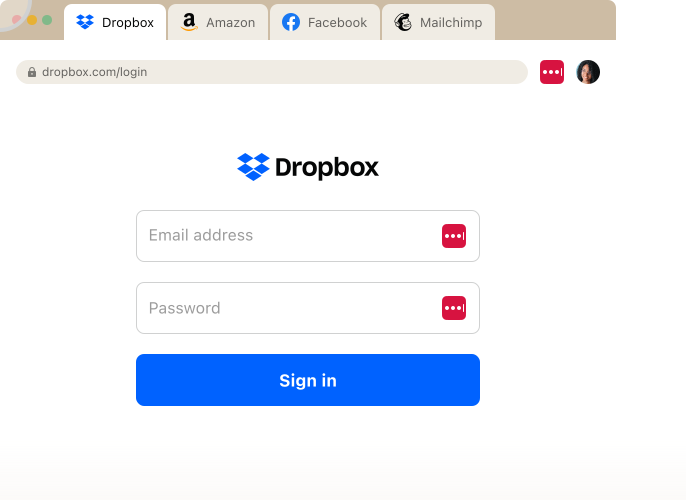
When an employee goes to a site they have credentials for, LastPass autofills those credentials for them. They don't need to toggle between screens. If there's an MFA code, LastPass autofills that too.
If a user is logging into a new tool that isn't currently saved in the vault, LastPass prompts them to save those credentials. Next time they visit that site, it fills in the username and password automatically. When an employee signs up on a new site or needs to update a password,
LastPass generates a strong, randomized password right in the browser, customizable by length and complexity.
LastPass also works alongside single sign-on (SSO). For example, if your business uses an identity provider like Okta or Microsoft Entra, SSO covers the apps that support it. But many SaaS tools either don't offer SSO or charge 2 to 4 times the base price for SSO-enabled tiers. For those apps, you can use LastPass to log in securely and quickly.
Set security rules by team, role, or individual
Different people in your organization have different levels of access and different risk profiles. Someone on your finance team logging into a banking portal has different security needs than a contractor checking a shared project board. A one-size-fits-all approach to password rules doesn't account for that.

With LastPass, you can set over 120 admin policies and scope each one to specific users or groups. For example, you can require MFA for your finance team when they access banking portals, enforce a minimum password length of 16 characters for company credentials, block logins from TOR networks across your entire organization, and set different rules for contractors versus full-time employees.
When you first sign up, LastPass provides a recommended set of default policies, so you're not starting from scratch.
See what tools your team is using (and set up restrictions)
59% of organizations say employees adopt AI tools and SaaS apps without first checking with IT.56% report that sensitive data gets uploaded to these unvetted applications. If no one's tracking this, you end up with dozens of apps that no one has approved and that no one has visibility into.
Not only is this a security issue, but often you’ll find that you're paying for apps you’re not using or you’re paying for multiple accounts at the same time.
With LastPass, the browser extension sees login activity across your team and makes it visible to you as an admin.

For example, in the image below of a company's SaaS Monitoring report, you can see that four employees are using ChatGPT, two through a corporate account and two through personal emails, and whether they're logging in via SSO, a vaulted password, or an unvaulted password. From there, you can approve it as a standard tool, restrict it, or push everyone to the corporate account.

(Learn more about SaaS Monitoring here.)
Once you can see what applications are being used, you can act on it.
For example, let’s say your business has an account at DHL for shipping. You can set it up so that when an employee visits a different shipping provider, like UPS, they receive a pop-up reminding them that you typically use DHL for your shipping needs.

You can also block applications and websites outright.

(Learn more about SaaS Protect.)
This combination of monitoring what tools your team is using and setting up restrictions or other guidelines is a great way to secure access for your company, while not stifling productivity.
Axxor, a global manufacturer with facilities in the Netherlands, Poland, and the US, found exactly this when they started using LastPass. Their employees were experimenting with AI tools like OpenAI and Canva. As their Process Engineer, Wout Zwiep, put it: "We don't want to block innovation, but we do want to guide it safely." The dashboard gave them the visibility to see which tools employees were using and decide which ones to bring under management. (Read the full case study here.)
See your organization's credential health and risk exposure in one view
With LastPass, you can see which employees have weak or reused passwords, which SaaS and AI apps your team is logging into, where employees may be creating risk, and if an employee's email address appears in a known data breach. All of this, along with an overall security score across your enrolled users, lives in one view.
Learn more about the security dashboard.)
Paul Longega, Managing Director atLove Struck, an international food and beverage company, described the benefits of our Security Dashboard: "LastPass alerts us to password vulnerabilities, checks if any credentials have appeared in data leaks or on the dark web, and rates the strength of our passwords. Having that level of automated monitoring has been incredibly valuable." (Read the full case study here.)
Next steps: Try LastPass for free
LastPass is a secure access platform that is easy to set up. That’s key for small businesses that want to limit their risk exposure, but don’t have a sophisticated IT team in place. Plus, the easier it is to set up your password manager, the more likely your team will use it to log in and access credentials.
HOLT CAT, a Caterpillar equipment dealer with 3,500+ employees, used all 2,500 of their initial seats in the first year. By year two, they expanded to 3,500 seats with 70% adoption, driven in part by employees requesting access on their own after seeing how easy the tool was to use. (Read the full case study here.)
The more your team uses LastPass, the more secure your company will be.
To learn more about how LastPass can help your organization manage secure access across your team, you can sign up for a demo or start a 14-day free trial.
1Password

1Password has a polished native Mac app. It integrates with Touch ID, has a strong Safari extension, and offers a clean interface that feels at home on macOS. It's a popular choice for technically minded teams, with features like SSH key management, a CLI for secrets automation, and Travel Mode, which lets employees hide sensitive vaults when crossing international borders.
Over the past few years, 1Password has been building out what they call Extended Access Management, adding device trust, SaaS management, and access controls on top of the core password manager. These come as separate add-ons with their own interfaces, which can drive up cost for small to midsize businesses that don't need all of them.
On the admin side, 1Password offers around 25 security policies, applied at the organization level rather than to specific users or groups. If your team has different departments with different security needs, you can't scope a policy to just your finance team or just your developers.
Phone support is available during business hours (9 to 5 EST).
As of this writing, 1Password's Business plans start at $7.99/user/month.
Click here to view 1Password’s full pricing details
Keeper

Keeper has a more customizable vault. You can color-code entries, create nested folders, and store more than just passwords, including files, photos, and documents. You can color-code entries, create nested folders, and store more than just passwords, including files, photos, and documents.
On Mac, Keeper integrates with Touch ID and has a Safari extension (KeeperFill) that handles autofill. It also holds FedRAMP, StateRAMP, and FIPS 140-3 certifications, which may matter if your organization works with government agencies or has specific compliance requirements.
Keeper encrypts each vault, folder, password, and file with its own unique AES-256 key. It offers granular vault access controls, so admins can set detailed permissions for who can view, edit, share, and archive items across shared folders.
While Keeper's initial pricing is competitive ($4 per user per month), multiple users have reported significant price increases at renewal (sometimes 40 to 200% higher than the first-year rate). Several features that are included in other password managers' base plans, like dark web monitoring, advanced reporting, and customer support, are paid add-ons with Keeper.
But there are two drawbacks to be aware of. First, when folder creators leave an organization, their shared folders can become "orphaned," meaning no one retains clear ownership or management access to the credentials inside them. Second, Keeper doesn't offer SaaS or AI visibility, so there's no way to see what tools your employees are signing into outside the vault or control access to unapproved applications.
As of this writing, Keeper’s Business plan starts at $4/user/month, their Enterprise plan is $6/user/month and dark web monitoring, advanced reporting, and compliance reports are paid add-ons.
Click here to view Keeper’s full pricing details
Bitwarden

Bitwarden works on Mac through browser extensions for Safari, Chrome, Firefox, and Edge, and it also has a desktop app for macOS. Its main differentiator is that the codebase is fully open-source and undergoes regular third-party security audits by Cure53, which makes it popular with developers, IT teams, and organizations where being able to inspect the code yourself is a requirement.
Bitwarden offers a self-hosting option for organizations that want full control over their infrastructure, and EU and US data residency options for cloud-hosted accounts.
Bitwarden has Access Intelligence, which flags weak or reused credentials across your team and includes a phishing blocker. But it only has visibility into applications where credentials are already stored in Bitwarden. It can't detect non-vaulted logins or show you which SaaS and AI tools employees are accessing outside the vault, and there's no way to block or restrict access to unapproved applications.
Bitwarden offers approximately 18 admin policies. There is no consolidated security dashboard, no continuous monitoring, and no automated breach notifications. Support is email and ticket-based only, with no phone support.
As of this writing, Bitwarden’s Teams plan is $4/user/month, while their Enterprise plan, which adds advanced policies, SSO integration, and API access, is $6/user/month.
Click here to view Bitwarden’s full pricing details
Dashlane

Dashlane works across Safari, Chrome, Firefox, and Edge on Mac, and user reviews consistently highlight how easy it is for non-technical employees to get started. The browser extension is fast, with machine-learning-adapted form filling. It covers the password management fundamentals and adds AI-powered security features through its Omnix platform: real-time phishing alerts, credential risk detection, and automated Slack nudges to flag risky behavior.
On the business side, Dashlane's admin controls are more limited. It offers roughly 16 org-level policies, and those policies apply organization-wide, so they can't be assigned to specific groups or users. Admin roles are limited to Admin, Group Manager, and User, with no custom roles available.
Dashlane offers some visibility into credential risk and SaaS usage, but it's focused more on credential detection and protection than on SaaS access governance. You can see some of what's being used, but it's a more limited view compared to tools with dedicated SaaS monitoring and control features.
All customer vault data is hosted in Dublin, Ireland, with no option to choose a different data center. For admins, email and chat are available in English, French, German, and Spanish. Live chat is available Monday through Friday, 6 AM to 6 PM ET. Zoom calls and phone support are available in English only, Monday through Friday, 9 AM to 6 PM ET. For end users, chat with an agent is available in English, French, German, or Spanish, Monday through Friday, 9 AM to 6 PM ET.
As of this writing, Dashlane’s Business plan is $8/user/month. They also offer a Credential Protection plan at $4/user/month, but it doesn't include password management.
Click here to view Dashlane’s full pricing details
Best password managers for Mac: for personal use
Often, Mac users utilize Apple's built-in Passwords app to save their logins, sync them across their devices, and autofill credentials in Safari, Chrome, and Edge. For basic personal use on Apple devices, it works fine.
But for some, its limitations are too significant, limitations such as:
- You can't organize credentials into custom folders.
- There's no way to securely share individual logins with a family member with any real control over permissions.
- There's no dark web monitoring or secure storage for things like API tokens, payment cards, or documents.
Below, we look at the best password managers for Mac for personal use.
LastPass

LastPass works across Safari, Chrome, Firefox, and Edge on Mac, with a browser extension that autofills your stored credentials (including MFA codes) without toggling between screens. When you create a new account on a site, LastPass generates a strong, randomized password right in the browser, customizable by length and complexity.
Your vault is encrypted locally using 256-bit AES encryption before anything reaches LastPass's servers, and LastPass uses a zero-knowledge approach, meaning we never have access to your stored data. Beyond passwords, you can store secure notes, Wi-Fi credentials, payment cards, documents, and other sensitive information in up to 1GB of encrypted file storage, all organized in folders you can customize.
If you're switching from Apple Passwords or Chrome's built-in manager, LastPass lets you import your existing credentials in a few minutes so nothing gets lost in the transition.
LastPass also offers a free Families plan with its business accounts, but even on the personal side, the Families plan lets you share credentials securely with up to five additional family members. Each person gets their own vault, and you can share specific items or folders without exposing your entire password library.
LastPass personal plans include dark web monitoring, which alerts you if your email addresses appear in known data breaches. You can see which of your passwords are weak or reused and update them directly from the vault.
Pricing
- LastPass offers a free tier, though it limits you to one device type (computers or mobile, not both).
- Premium is $3/month (billed annually).
- Families is $4/month for up to 6 users.
1Password

1Password has one of the most polished Mac apps of any password manager. It feels native to macOS, integrates with Touch ID, and has a strong Safari extension. This is a plus for teams who really like that Mac interface.
1Password also has features geared toward power users. Travel Mode lets you hide sensitive vaults when crossing international borders, so only the vaults you mark as "safe for travel" are visible on your device. It also offers SSH key management and a CLI for secrets automation, which makes it popular with developers.
You can share credentials with people outside your 1Password account via links, which is useful for sharing a login with a contractor or family member who doesn't use 1Password.
Click here for 1Password’s full pricing details
Bitwarden
Bitwarden is a good option for Mac users who want a full-featured password manager without paying anything. The free tier includes unlimited password storage, sync across all devices, and a browser extension for Safari, Chrome, Firefox, and Edge.
Bitwarden's codebase is fully open-source and undergoes regular third-party security audits by Cure53. If you're the kind of person who wants to verify the code behind the tool you're trusting with all your credentials, Bitwarden is the only major option that lets you do that.
It also offers a self-hosting option, so you can run Bitwarden on your own server instead of trusting their cloud infrastructure. For most personal users, this is overkill, but it's there if you want it.
The tradeoff is the interface. Bitwarden has been described as less polished than 1Password or Dashlane. Autofill works but can feel less smooth than competitors, and sharing is more limited on the free tier. The premium plan adds features like advanced 2FA options, vault health reports, and 5GB of encrypted file storage.
Click here for Bitwarden's full pricing details
NordPass

NordPass is from the same company that makes NordVPN, and the main draw is affordability. It uses XChaCha20 encryption with Argon2id key derivation, which are newer cryptographic standards than the AES-256 and PBKDF2 used by most competitors.
The Mac app is clean and responsive, it integrates with Touch ID, and the Safari extension handles autofill well. NordPass includes dark web monitoring on the premium plan, and you can bundle it with NordVPN and NordLocker if you already use other Nord products.
The free plan lets you store unlimited passwords but limits you to one active device session at a time, which means you have to log out on your Mac to use it on your phone. The premium plan removes that limitation and adds password sharing and vault health reports.
NordPass is a straightforward option if you want basic password management at a low price. It doesn't have the depth of features or the polish of LastPass, but it covers the fundamentals.
Click here for NordPass's full pricing details
Keeper
Keeper’s customizable vault lets you color-code entries, create nested folders, switch between grid and list views, and store files, photos, and documents.
On Mac, Keeper integrates with Touch ID and has a Safari extension (KeeperFill) that handles autofill. It uses AES-256 encryption with a zero-knowledge architecture, and it supports several
2FA methods including TOTP, FIDO WebAuthn, Duo, and RSA SecurID.
At the time of this writing, Keeper's personal pricing starts around $3.58/month, but some features that other password managers include in their base plans, like dark web monitoring (BreachWatch) and secure file storage, are paid add-ons. That can make the total cost higher than it looks at first glance.
Click here for Keeper's full pricing details
RoboForm

RoboForm started as a form-filling tool and added password management on top of it.
On Mac, RoboForm has a native app with Touch ID support and browser extensions for Safari, Chrome, Firefox, and Edge. It includes a built-in TOTP authenticator, so you don't need a separate app like Google Authenticator or Authy for two-factor authentication. When you log into a site with 2FA enabled, RoboForm generates and autofills the code for you.
RoboForm also offers a local-only storage option, where your encrypted vault never touches the cloud. For most people, cloud sync is more convenient, but if you want to keep your data entirely on your own devices, RoboForm is one of the few password managers that still lets you do that.
The tradeoff is the interface. RoboForm's desktop app looks dated compared to 1Password or Dashlane, and you can't create new login entries directly in the app. You have to capture them through the browser extension or the web dashboard. Sharing is also limited to other RoboForm users, so you can't send a secure link to someone who doesn't have an account.
Click here for RoboForm’s pricing details
Dashlane

Dashlane covers the password management fundamentals and bundles in a built-in VPN (Hotspot Shield) at no extra cost, which is unusual for a password manager. It also offers AI-powered phishing alerts through its Omnix platform, which can flag risky sites before you interact with them.
The browser extension is fast, with machine-learning-adapted form filling, and user reviews consistently highlight how easy it is for non-technical users to get started. Dashlane works across Safari, Chrome, Firefox, and Edge on Mac.
Dashlane also supports passwordless login with in-browser passkeys and master-password-free accounts.
The main limitation on the personal side is price. At the time of this writing, Dashlane's premium plan is $4.99/month for individuals, which puts it at the higher end of the personal password manager market.
Click here for Dashlane’s pricing details
Next steps: how to switch to a new password manager on Mac
Every password manager on this list works on Mac, supports Safari, and can import your existing credentials. The switch itself is straightforward regardless of which tool you choose. But what that switch looks like depends on whether you're setting things up for yourself or for a team.
For personal use, the process generally is quick:
- Export your existing passwords from Apple Passwords (Safari > Settings > Passwords > Export All Passwords) or Chrome (Settings > Password Manager > Export Passwords) as a CSV file.
- Import that CSV into your new password manager.
- Install the browser extension for Safari and whatever other browsers you use.
- Enable Touch ID for biometric unlock.
- Set the new tool as your default autofill provider in macOS System Settings. You may want to disable Safari's built-in autofill at the same time to avoid conflicts.
You don't need to update every password on day one. Let the password manager flag your weak or reused credentials and work through them over time.
For businesses, the technical setup varies by tool. Some require desktop agents or manual configuration per device. With LastPass, setup runs entirely from the browser. You create the account, invite team members, and they install the browser extension. They can import their existing saved passwords from Chrome, Edge, or Safari so nothing gets left behind. From there, the browser extension and autofill handle most of the daily work.
Because it runs from the browser, LastPass makes it easier for you to get started and for your team to adopt the new system. This is a major win for businesses, especially ones with larger teams. HOLT CAT, a Caterpillar equipment dealer with 3,500+ employees, filled all 2,500 of their initial LastPass seats in the first year. By year two, they expanded to 3,500 seats with 70% adoption, driven in part by employees requesting access on their own after seeing how easy the tool was to use. (Read the full case study here.)
To learn more about how LastPass can help your organization manage secure access across your team, you cansign up for a demo orstart a 14-day free trial.
Additional resources


