
Data shows that 55% of organizations say employees adopt AI tools and SaaS apps without checking with IT first. This is likely to become an even more prevalent issue as more SaaS and AI platforms become available. While this can lead to your team finding more efficient ways to do their job, it also creates security risks for your organization. As your employees create new logins and access new tools, there’s an increased risk of a security breach. One of the big issues here is simply a lack of visibility: you can’t see what your employees are logging into.
A cloud access security broker (CASB) is built to solve that. A CASB sits between your employees and the cloud apps they use, so you can see which apps are being used (including the shadow IT and shadow AI nobody told you about), control which ones are allowed, and produce the access records a compliance audit asks for.
As you evaluate your options, you’ll quickly realize that most CASB tools are built for large enterprises. They're deployed as a module of a bigger SSE or SASE platform, they route traffic through a proxy, and they assume you have a security team to tune policies and a budget to match. For some organizations that's exactly right. But for a lot of small to midsize businesses, it's more than the problem calls for.
So this article covers both ends of the range. We look at the traditional, enterprise-grade CASB platforms you'd expect to find on a list like this, and we cover lighter tools like LastPass that handle the core jobs a CASB gets bought for (discovering shadow SaaS and AI, controlling access, and securing the logins behind them) without the full deployment.
Note: Tool comparison reflects information as of August 2026.
What is a CASB (cloud access security broker)?
A CASB is software that sits between your employees and the cloud apps they use, and enforces your security rules every time someone accesses an app.
CASBs can technically cover SaaS, PaaS, and IaaS, but the SaaS use case is the one most organizations care about, so that's where we'll focus.
Whatever the vendor calls it, a CASB is really trying to do four things:
-
Visibility: discover the cloud apps your team is using, whether you approved it or not.
-
Data security: control who can access what, and keep sensitive data from leaving where it shouldn't.
-
Threat protection: flag risky behavior, compromised accounts, and malware.
-
Compliance: produce the records you need for SOC 2, HIPAA, PCI DSS, or GDPR.
And nearly every CASB goes about it the same way, in three steps:
-
Discovery: automatically detect which apps and users are active.
-
Classification: score each app by risk, based on what it is and what data it holds.
-
Remediation: enforce a policy when something crosses a line, whether that's blocking it, alerting you, or warning the user.
Strip away the acronyms and a CASB is answering three questions: what cloud apps are my people using, how are they getting into them, and can I control access?
Do you actually need a full CASB?
Most of the tools on a list like this are built for a specific kind of buyer: a company with a dedicated security team, an existing SSE or SASE investment, and months to spend tuning policies.
So before you evaluate products, it's worth deciding how much CASB you actually need.
You probably do need a full CASB or SSE platform if:
-
You're in a heavily regulated industry with content-aware DLP requirements.
-
You handle regulated data inside a handful of large, sanctioned cloud platforms.
-
You already own Zscaler, Prisma Access, or Microsoft E5, and can turn on CASB as a module you're paying for anyway.
-
You have the staff to run inline policy tuning after the tool goes live.
You probably don't need one if:
-
Your fleet is under a few hundred users.
-
Your real data risk is credentials and pasted content, not bulk file exfiltration.
-
You don't have a dedicated security headcount.
-
Your top worry is that people are using tools you've never heard of.
If you're in that second group, it helps to name the outcome you're actually buying. Most teams looking at CASBs want three things: to discover which SaaS and AI tools are in use, to control which ones are allowed, and to secure the logins behind them. You can get all three without putting a proxy in your network path.
As you search for the best solution, keep in mind that the categories below overlap, and buying the wrong one is how companies end up paying enterprise prices for features they never switch on.
-
CASB governs data in motion between your users and their cloud apps.
-
SSPM inspects the internal configuration of apps you already own.
-
SSE and SASE are bundles that package a CASB alongside other tools like SWG, ZTNA, and FWaaS (web filtering, zero-trust access, and cloud firewalling).
-
Secure access management covers the credentials, policies, and app-level access behind every login.
And whatever you buy, the per-seat price is often the smallest part of the total cost. The real bill includes deployment hours, network changes, identity provider integration, and tuning cycles, plus whether your team can maintain the thing once the vendor's onboarding call is over.
10 of the best CASB tools
1. LastPass
LastPass is a simple-to-use, easy-to-deploy secure access management tool built for small to midsize businesses. It combines credential management, customizable access policies, and visibility into which SaaS and AI tools your employees are using, without needing technical expertise to set up.
It's worth being upfront about where LastPass fits on a list like this. LastPass is not a full inline CASB with content-aware DLP (the deep content scanning that reads files as they move and can block, say, a customer list or a batch of credit card numbers from being uploaded somewhere it shouldn't go). Rather, LastPass is built for IT teams that don't have the budget, time, or technical resources to stand up a complex enterprise platform, but still need the three outcomes most CASB buyers are really after:
-
Discover the shadow SaaS and AI in use
-
Control which apps are allowed
-
Secure the credentials behind every login.
That last one is something a traditional CASB doesn't do at all, and it's where a lot of the risk actually starts.
You can start a 14-day free trial with full access to the vault, browser extension, admin policies, Security Dashboard, and SaaS Monitoring, or book a demo.
Discover every SaaS and AI tool your team is using
Discovery is the first step of any CASB, and in LastPass it's handled by a feature called SaaS Monitoring. SaaS Monitoring shows you which SaaS and AI tools your employees are signing into, how they're logging in, and which apps aren't being managed.
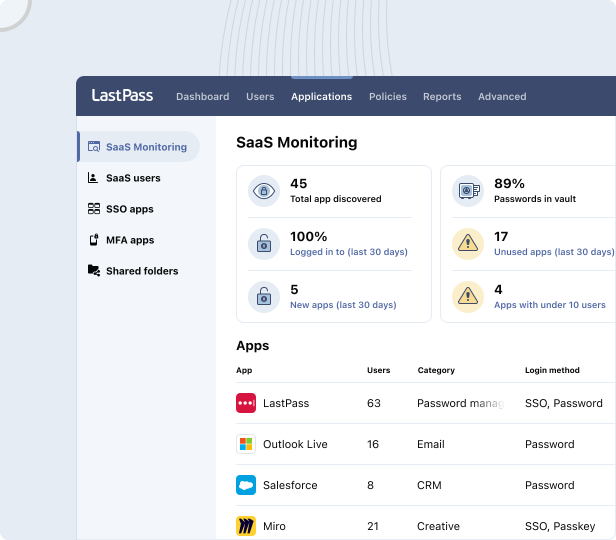
SaaS Monitoring works through the LastPass browser extension your team already has installed, so there's no additional agent to deploy, no proxy, and no network reconfiguration. Because it works from the browser rather than the network, it catches logins in that browser even when an employee is working off your network and their traffic never touches a corporate proxy.
Your dashboard shows:
-
How many apps have been discovered.
-
How employees are logging in (SSO, vaulted password, passkey, or unvaulted password).
-
Whether they're using personal or corporate credentials.
-
Which apps haven't been touched in the last 30 days.
-
Whether any credentials are sitting outside the vault.
For example, the dashboard might show four employees using ChatGPT: two on corporate accounts and two on personal ones. You can see whether each created a password or logged in with Google SSO, and when they last logged in. That's the level of detail you need before you can set a sensible rule.
This is as much a cost story as a security one. The average company now runs about 106 SaaS apps, and Gartner estimates that 30 to 40% of IT spending goes to shadow IT. Seeing which apps nobody has opened in a month tells you exactly where you're wasting money.
SaaS Protect: block, warn, or approve apps without a proxy
SaaS Protect is how you act on what SaaS Monitoring turns up. For any tool it surfaces, you can grant access, warn users, or block it completely:
-
Block an app. When someone tries to reach a blocked app, they see a LastPass block screen in their browser. You can customize it to explain why the app is blocked or point them to an approved alternative.
-
Allow an app, with an optional pop-up. The tool stays available, but you can attach a message that appears when the employee opens it. That message is yours to write: a warning not to paste confidential company data into a generative AI tool, or an informational nudge that your company's shipping account is with DHL, not UPS or FedEx. (56% of organizations report sensitive data being uploaded to un-vetted applications.)
Axxor, a global manufacturer, used SaaS Monitoring and SaaS Protect to surface employee logins to AI tools like OpenAI and Canva, then decide which to bring under management. "We don't want to block innovation, but we do want to guide it safely," says Process Engineer Wout Zwiep. (Read the full Axxor case study.)
Over 120 admin policies, scoped to users and groups
Admin policies are the rules you set from the admin console for how your team logs in and uses the vault. LastPass has over 120 of them, and you can apply each one to everyone, to a specific group, or to a single user, with no technical setup to enable them.
A few examples of what you can set:
-
Multi-factor authentication: require MFA and choose which methods are allowed.
-
Geofencing: allow logins from locations you trust and block them everywhere else.
-
Master password requirements: set how long and how strong master passwords have to be.
-
Offline access: decide whether the vault can be used offline, or only online with MFA.
-
Admin console limits: control how much of the admin console each admin can reach, so help-desk staff can support people without full access.
Because every policy can be scoped, you can hold the people handling your most sensitive systems (finance, IT, anyone touching customer or health data) to stricter rules than the rest of the team, without changing the experience for everyone else. When you sign up, LastPass gives you a recommended set of default policies, to help bolster security.
The layer most CASBs miss: the credentials behind every login
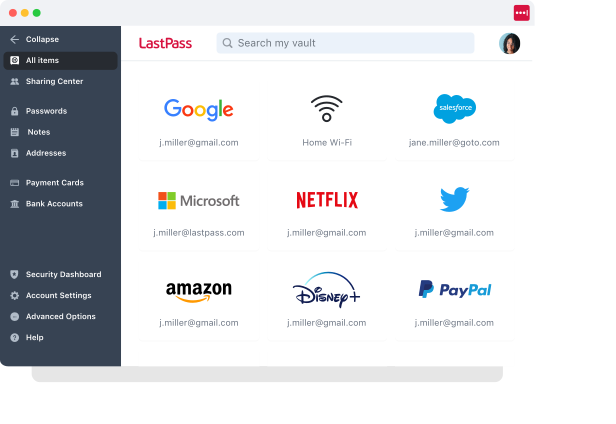
Shadow IT usually starts with a credential. An employee signs up for a new tool with a work email and reuses a password they already use somewhere else. A network-based CASB can see the traffic to that app, but it can't do anything about the password behind the login, and that password is often the actual risk. That's the gap a password manager fills.
Without one, employees default to whatever's quickest: reusing passwords, saving them in the browser where you have no visibility, and sharing logins over Slack or email.
LastPass gives every employee an encrypted vault. Their credentials live there, organized into folders, and you give each person or group access to only the folders they need. Passwords are most of what's in there, but the vault also holds API keys, Wi-Fi credentials, and payment cards. Everything is encrypted locally with 256-bit AES before it reaches our servers, and LastPass uses a zero-knowledge approach, meaning we never see your master password or your stored data.
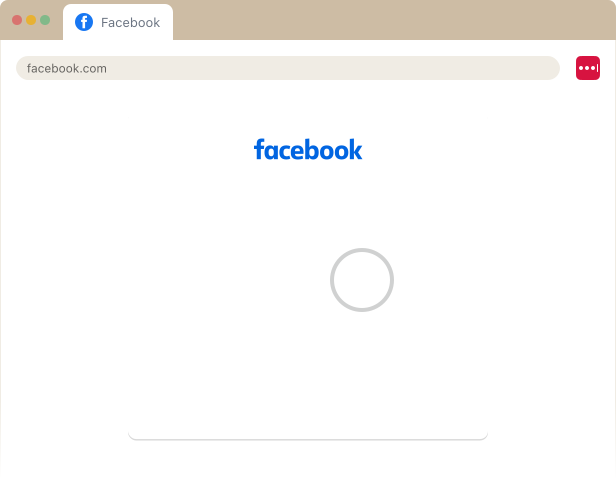
The browser extension (available for Chrome, Firefox, Safari, and Edge) fills those credentials and MFA codes as your team works, and generates a strong, unique password whenever someone signs up for a new tool. That makes the secure option the easy one, rather than an extra step people skip.
Plus, because you control who can reach which folders, LastPass makes it easy to revoke access. Say someone leaves the team: you revoke their access from the Sharing Center, and the shared credentials they'd been using stay in the vault for whoever takes over, so you're not resetting every shared password.
Forsters LLP, a London law firm with more than 500 employees, had exactly that concern with turnover. "The risk of losing access to systems when people left the firm was high," says InfoSec Manager Neil Bell. (Read the full Forsters LLP case study.)
There's a cost angle too. Password resets can account for up to 50% of IT help desk tickets at roughly $70 each, and employees lose around 11 hours a year to password and access issues (Yubico and Ponemon Institute).
Security Dashboard, dark web monitoring, and compliance reporting
The Security Dashboard gives you an overall security score across your enrolled users, and flags who has weak, reused, or compromised passwords. You get that picture without ever seeing an actual password: you can tell that three people need to update their credentials, but the credentials themselves stay hidden.
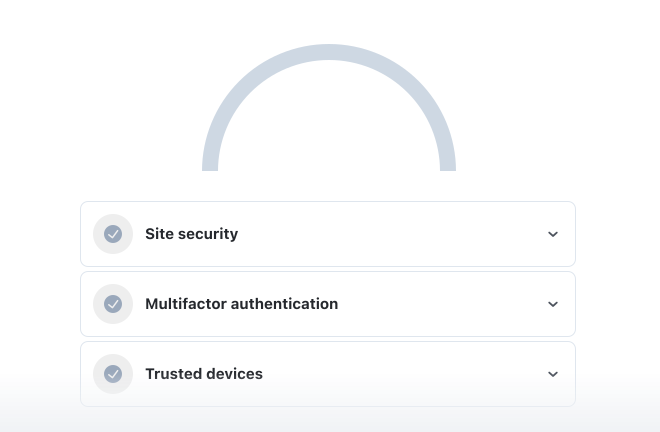
Alongside it, dark web monitoring checks your employees' email addresses against known breach databases. When an address turns up in a breach, both the employee and the admin are alerted, so you can act on a real exposure instead of running an arbitrary company-wide password reset.
"LastPass alerts us to password vulnerabilities, checks if any credentials have appeared in data leaks or on the dark web, and rates the strength of our passwords. Having that level of automated monitoring has been incredibly valuable," says Paul Longega, Managing Director at Love Struck. (Read the full Love Struck case study.)
For compliance, the admin console adds a record of policy enforcement, password changes, and user activity. Together with the app-usage logs from SaaS Protect, that gives you both the documentation of what your controls are and evidence they're being enforced, which is what SOC 2, HIPAA, or GDPR auditors are asking for.
How LastPass works alongside SSO, SSE, and your existing stack
If you already run an identity provider like Okta or Microsoft Entra, LastPass isn't necessarily a replacement for it. SSO handles the apps that support it, and LastPass covers everything else.
That "everything else" is bigger than it sounds. Plenty of SaaS tools, especially smaller or cheaper ones, either don't support SSO or charge two to four times the base price for the tier that includes it (the "SSO tax"). Those are exactly the apps employees sign up for on their own, and exactly where unmanaged credentials pile up. LastPass stores and fills the logins for them, so they don't fall outside your control. Our Business Max plan includes unlimited SSO apps and advanced MFA, so you can federate what's worth federating and manage the rest in the vault.
The same holds if you already own an SSE or SASE platform. LastPass isn't competing with it. It adds credential-level control and browser-based app discovery for the personal-account and off-network logins a network proxy doesn't see.
Setup, adoption, support, and pricing
Because LastPass runs from the browser, setup is quick. You create your account, invite your team, and everyone installs the browser extension. There are no agents to push, no VPNs, and no network reconfiguration, so you can deploy across the whole company in an afternoon. If your team is already saving passwords in Chrome, Edge, or another browser, you can import those credentials so nothing gets left behind.
OTO Technology, a managed service provider that deploys LastPass for clients across France, the US, and Japan, onboards each user in under five minutes. (Read the full OTO Technology case study.)
Once you're live, your Adoption Dashboard tracks how much of your team is actually using LastPass: your license consumption rate (how many purchased seats are in use), your enrollment rate (how many invited users have activated), and your active usage rate (how many have used it in the last 30 days), with one-click reminders for anyone who's lapsed.
HOLT CAT, a Caterpillar equipment dealer with more than 3,500 employees, is one example of adoption at scale. It put all 2,500 of its initial seats to use in the first year and expanded to 3,500, reaching 70% adoption by year two, with employees requesting access on their own. (Read the full HOLT CAT case study.)
You can start a free trial or book a demo to see it in your own environment.
2. Nudge Security
Nudge Security is a SaaS and AI security management platform that discovers the apps, accounts, and identities tied to your organization. It connects to Google Workspace or Microsoft 365 through an API and builds an inventory of the SaaS and AI tools employees have signed up for, including OAuth grants and shadow AI, without a proxy, agent, or network change. Notably, Nudge markets itself as an alternative to a CASB rather than a CASB: it runs out-of-band and doesn't sit inline or block user access (though it can revoke risky OAuth grants). Instead of hard controls, it governs through automated "nudges" that prompt employees at the point of risk, along with SaaS security posture management and third-party risk features.
Best for organizations that want fast discovery and governance of shadow SaaS and AI across unmanaged devices without deploying inline infrastructure, and that don't need blocking or a credential vault. Nudge publishes self-serve pricing and offers a free trial. (View Nudge Security's pricing.)
3. Netskope
Netskope One CASB is part of Netskope's broader SSE and SASE platform. It discovers managed and unmanaged cloud apps, risk-scores them with machine learning, and can distinguish corporate from personal instances of the same app. Its cloud DLP includes a large library of data classifiers and file types, alongside advanced threat protection, malware analysis, and user-behavior analytics. Netskope operates in two modes: inline enforcement in real time, delivered through its own cloud network, and out-of-band API inspection for data at rest in sanctioned apps.
Best for larger enterprises with mature cloud governance programs that need real-time DLP and deep traffic visibility, and that have the security staff to run it. Pricing is quote-based. (Contact Netskope for pricing.)
4. Palo Alto Networks Prisma Access
Palo Alto delivers CASB as SaaS Security within its Prisma Access and Prisma SASE platform. It uses machine learning to discover and categorize SaaS and generative AI apps, with a dedicated AI Access Security component for sanctioned and shadow AI. Data protection runs both inline and through APIs, and the platform adds SaaS security posture management, inline malware prevention, and behavior-based threat detection, all managed from Strata Cloud Manager. Because it's SASE-native, inline enforcement runs through Prisma Access.
Best for organizations already invested in Palo Alto that want to consolidate cloud access security into a SASE or SSE platform they own. Pricing is quote-based and enterprise-tier. (Contact Palo Alto for pricing.)
5. Zscaler CASB
Zscaler's multimode CASB is built into its Zero Trust Exchange, the company's SSE platform. It discovers shadow IT with risk scoring, applies inline DLP to block sensitive uploads, and scans data at rest in SaaS and public cloud through API integrations. It also includes ML-based threat protection with cloud sandboxing, SaaS posture management, and agentless browser isolation for unmanaged devices. Inline enforcement runs through Zscaler's proxy architecture with TLS inspection; API mode handles data at rest.
Best for organizations already running Zscaler that want to extend zero trust into SaaS governance. It's sold as part of the broader platform, with quote-based pricing. (View Zscaler's plans.)
6. Microsoft Defender for Cloud Apps
Microsoft Defender for Cloud Apps is Microsoft's CASB, delivered as part of Defender XDR. It provides cloud app discovery and risk assessment (scoring discovered apps against 90 risk indicators), SaaS security posture management surfaced through Microsoft Secure Score, and information protection through integration with Microsoft Purview. Real-time session controls come from Conditional Access App Control, a reverse-proxy capability that works through Microsoft Entra ID (and any other IdP), and app governance covers OAuth-connected apps. Its coverage is deepest across the Microsoft 365 estate (SharePoint, Teams, OneDrive), with API connectors for a range of third-party SaaS apps.
Best for Microsoft-first organizations that want to keep cloud app security inside the Microsoft stack. It's licensed per user, available standalone or bundled in Microsoft 365 E5, which makes it cost-effective for teams already on E5 and an added expense for those who aren't. (View Microsoft 365 licensing.)
7. Forcepoint ONE
Forcepoint's CASB is part of its Forcepoint ONE SSE platform and is built around data protection. It reports on and blocks shadow IT, inspects cloud apps through both API and inline modes, and enforces DLP with a large set of classifiers and policy templates. It integrates tightly with Forcepoint DLP, applies to sanctioned apps and generative AI (including visibility into Microsoft Copilot activity), and supports agentless access for unmanaged devices. Forcepoint offers three deployment methods: API-based inspection, reverse proxy for managed devices, and forward proxy for BYOD.
Best for regulated enterprises in sectors like financial services, healthcare, and government where content-aware data controls are the priority. Pricing is quote-based. (Request Forcepoint pricing.)
8. Skyhigh Security
Skyhigh CASB (formerly McAfee and MVISION CASB) is a multimode CASB within the Skyhigh Security SSE platform. It discovers sensitive data at rest, monitors and controls cloud activity in real time, and scores cloud services through a large registry with a detailed risk-assessment model. Its unified DLP supports exact and indexed data matching and OCR, and it adds threat protection with user-behavior analytics and inline sandboxing, SaaS misconfiguration monitoring, and device-based controls. It runs in multiple modes: forward proxy, reverse proxy, and API.
Best for compliance-heavy enterprises that want a dedicated, vendor-neutral SSE platform without locking into a single network vendor. Pricing is quote-based. (Contact Skyhigh for pricing.)
9. miniOrange CASB
miniOrange CASB is part of miniOrange's broader identity and access management suite. It offers granular access control by role, device, location, IP, and time; real-time activity monitoring with alerts; and cloud data protection that can restrict unauthorized sharing and downloads. It includes SSO and role-based access for cloud apps, shadow IT discovery with app allow and block lists, DLP, and compliance logging for frameworks like GDPR, HIPAA, and PCI DSS. It can be deployed in the cloud or on-premises, and enforcement is proxy-based with prebuilt integrations for apps like Google Workspace, Microsoft 365, Salesforce, and Slack.
Best for smaller and mid-market organizations that want CASB functionality with hybrid or on-premises deployment options. It's a lighter-weight platform than the enterprise SSE vendors. miniOrange lists pricing with a free trial available. (View miniOrange CASB pricing.)
10. ManageEngine Log360
ManageEngine delivers CASB capabilities as an integrated part of Log360, its unified SIEM platform, rather than as a standalone product. Within Log360, the CASB tracks cloud app usage, flags attempts to access unsanctioned apps, and maintains shadow-app lists, using deep packet inspection to analyze file contents and detect malware uploaded to the cloud. It ties into Log360's identity monitoring and alerting, and produces audit-ready compliance reports for GDPR, HIPAA, and NIST. It uses proxy-based deployment (both forward and reverse proxy) and runs as part of Log360, on-premises or in the cloud.
Best for mid-sized organizations that want to correlate cloud app activity with their security logs and compliance reporting in a single platform. Because CASB is one module within the SIEM, it's a fit if you're adopting Log360 broadly rather than buying a dedicated CASB. Pricing is quote-based, with a free edition and trial available. (Get Log360 pricing.)
Final thoughts: matching the tool to what you actually need
Every CASB here aims at the same job: showing you what cloud apps your team is using, controlling which ones are allowed, and giving you the records to prove it. Where they differ is who they're built for.
If you're a large or heavily regulated organization with content-aware DLP requirements, a security team to run policy tuning, or an existing SSE investment, one of the enterprise platforms here (Netskope, Palo Alto, Zscaler, Microsoft, Forcepoint, or Skyhigh) is likely the right fit. If you're already deep in one vendor's stack, the CASB module you're paying for anyway is the natural place to start.
If you're a small or midsize business without dedicated security headcount, and your real risk is unmanaged apps and the reused, shared, or personal credentials behind them, you probably don't need a full proxy-based platform. A tool like LastPass covers the three outcomes that matter most (discovering shadow SaaS and AI, controlling access, and securing the logins), deploys from the browser in an afternoon, and adds the password management a traditional CASB doesn't touch.
The best way to decide is to name the outcome you're buying and match it to the lightest tool that delivers it. If that sounds like LastPass, you can start a free trial or book a demo.