
Shadow IT is any app, tool, or service your team uses for work that IT hasn't approved or doesn't know about.
Unchecked SaaS sprawl can:
-
Leave you open to breaches through unknown accounts, unmanaged credentials, and over-permissive integrations.
-
Make you non-compliant. When an app hasn't been vetted or approved, you have no record of how it stores your data or who can reach it, which can put you out of step with SOC 2, HIPAA, GDPR, and other requirements you're held to.
-
Drive up operating expenses. Your team might be paying for two tools that do the same job, or renewing licenses for apps nobody's opened in months.
And SaaS sprawl is widespread: 55% of organizations say employees adopt SaaS tools without checking with IT first.
The problem for most small to midsize businesses is that there's no practical way to handle shadow IT. You don't have a framework for detecting unsanctioned tools, evaluating which are safe, and governing the rest without getting in the way of your team's productivity. And you don't have the time or budget to deploy a cloud access security broker or proxy that inspects all your network traffic.
In this post, we look at a shadow IT management solution built for small to midsize businesses.
How to manage your shadow IT with LastPass
LastPass is a password manager that organizations can use to securely store credentials and let their team log in easily and safely via a browser extension.
But unlike other password managers, LastPass also has advanced shadow IT features that were designed to be used by small to midsize businesses. Two key features do most of the work here:
-
SaaS Monitoring, which shows you which apps your team is actually logging into, and
-
SaaS Protect, which lets you block, warn, or allow those apps based on rules you set. Both run through the same browser extension your team already uses for autofill, so there are no device agents or extra software to install.
Our client Axxor is a good example of what managing shadow IT with LastPass looks like in practice. Axxor is a global paper honeycomb manufacturer with facilities in the Netherlands, Poland, and the US. When Wout Zwiep joined as a Process Engineer, there wasn't a real IT department. Passwords were written on Post-its (some out on the production floor), shared informally, and saved in browsers. He made the security case for deploying LastPass across the organization to leadership, got approval, and rolled LastPass out across all three sites.
On top of the password management features, which we do cover below in more detail, Zwiep used SaaS Monitoring to see which tools his team had picked up on their own. A lot of them were AI tools, like OpenAI and Canva, that people were experimenting with to work faster. Rather than shut that down, he used LastPass to safely manage what tools his team was using.
“We don't want to block innovation, but we do want to guide it safely," he said. An employee opening a generative AI tool gets a friendly, educational warning (a reminder not to paste confidential company data, say) instead of a hard block, so they understand the risk without losing the tool. For sites that pose greater risks, Zwiep can use LastPass to block them completely.
Today Zwiep manages over 75 accounts on his own, with adoption still growing, and he has visibility into the AI and SaaS usage that used to happen out of sight. (Read the full Axxor case study.)
To see how LastPass can help you manage shadow IT (on top of password management for your team), you can:
Or keep reading below where we provide a detailed walkthrough on key LastPass features.
See what tools your team is using and restrict access as needed
The LastPass SaaS Monitoring tool runs through the browser extension that everyone on your team can easily install. With SaaS Monitoring, you can see which apps your team is logging into, how they're logging in (SSO, vaulted password, passkey, or an unvaulted password), and whether they're using personal or corporate credentials.
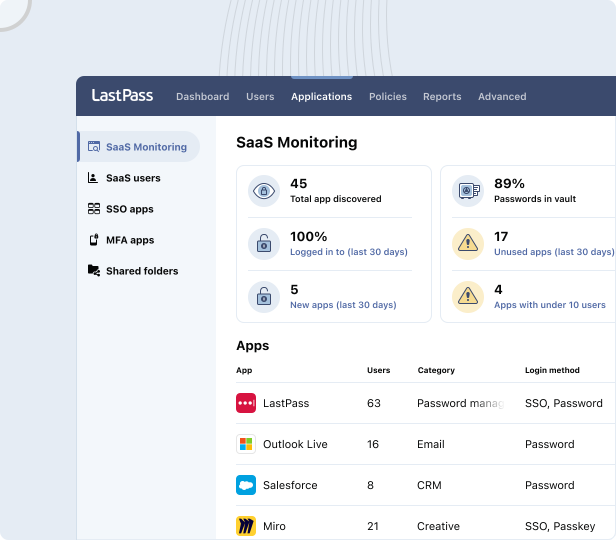
Here’s a screenshot from a SaaS Monitoring dashboard, where you can see that four employees are using ChatGPT: two on corporate accounts and two on personal ones.
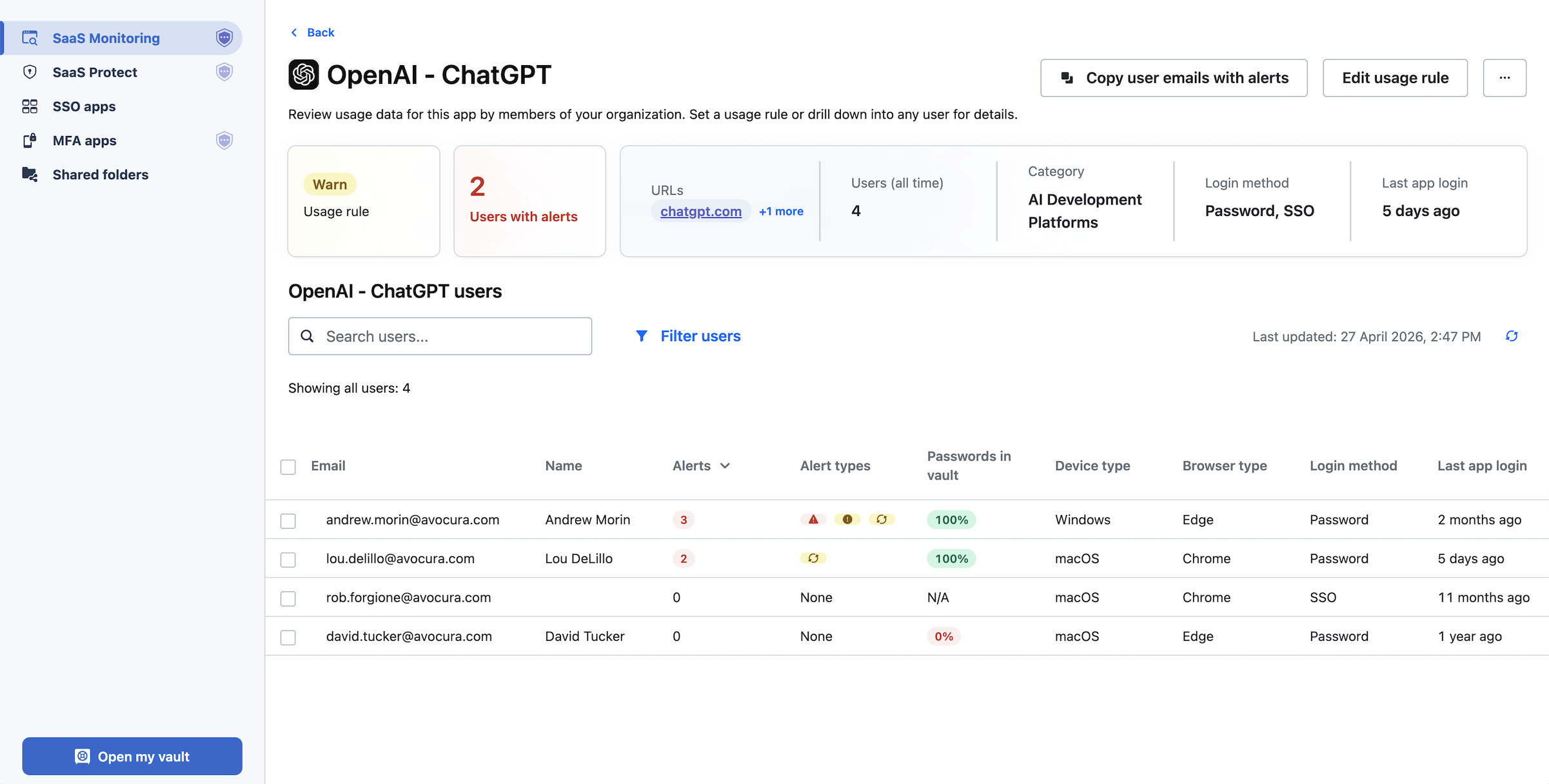
You can see whether they set up a password or signed in with Google SSO, and when they last logged in. From there, you decide what to do: approve ChatGPT as a standard tool, restrict it, or move everyone onto the corporate account.
That visibility helps with cost, too. When you can see every app in use, you can spot the duplicates (two teams paying for different tools that do the same thing) and the licenses nobody's touched in months, then consolidate.
Once you can see what's being used, SaaS Protect lets you act on it. With SaaS Protect, you can:
-
Block: Stop access to an app outright. When someone tries to open a blocked app, they see a LastPass block screen in their browser. You can customize it to explain why the app is blocked or point them to an approved alternative.
-
Warn: Attach a warning message that appears when an employee logs in. For example, when someone opens a generative AI tool, you can remind them not to paste confidential company data.
-
Inform: Add an informational pop-up. For example, if your company has an account with DHL, you can set a pop-up that appears when someone goes to UPS or FedEx, reminding them which provider you already use.

With SaaS Monitoring and SaaS Protect, you can see every app your team touches and decide, app by app, whether to block it, warn on it, or let it through.
Get a detailed overview of usage with your Adoption Dashboard
With LastPass, you get an Adoption Dashboard that shows you three helpful metrics.
-
License consumption rate. This is how many of the seats you've purchased are in use. If you bought 50 and only 32 are active, you're paying for 18 you could reclaim or reassign.
-
Enrollment rate. This is how many of the people you invited have activated their account. A low number tells you onboarding stalled, and who still needs a nudge.
-
Active usage rate. This is how many enrolled users have actually used LastPass in the last 30 days. A security tool only protects you if people use it, so this is the metric that tells you whether adoption stuck or whether people enrolled and then drifted back to old habits.

Together, these metrics show you where your rollout stands and where to focus: who hasn't enrolled, who enrolled but isn't using it, and how many seats are sitting idle.
Bonus: it’s easy for teams to adopt LastPass
LastPass is designed so small to midsize businesses, either with a strapped IT department, or no IT department at all, can easily adopt secure access across their organization.
LastPass runs in the browser extension your team already uses for autofill, so it's not a separate app they have to learn. It saves them time from day one by filling passwords and MFA codes in one click. And every employee gets a free Families plan for personal use, so the same tool covers their own logins too, which gives them a reason to use it beyond an IT mandate.
For example, at HOLT CAT, adoption grew to the point that employees started requesting access before it was assigned to them. The company used all 2,500 of its initial seats in the first year, then expanded to 3,500 and reached 70% active adoption by year two.
Other key LastPass features
Beyond shadow IT, LastPass covers the credential basics your team relies on every day.
A secure, encrypted vault
Every employee gets an encrypted vault for their work logins. It's encrypted locally with 256-bit AES before it ever reaches our servers, and LastPass uses a zero-knowledge approach, meaning we never see your master password or the data inside. The vault holds more than passwords: you can store secure API tokens, Wi-Fi credentials, payment cards, and other sensitive business information, organized into folders. As an admin, you control which folders are shared with which people.
The LastPass browser extension
The browser extension (available for Chrome, Firefox, Safari, and Edge) is where most of this happens day to day. It autofills passwords and MFA codes in one click, so employees aren't toggling between screens or retyping codes.
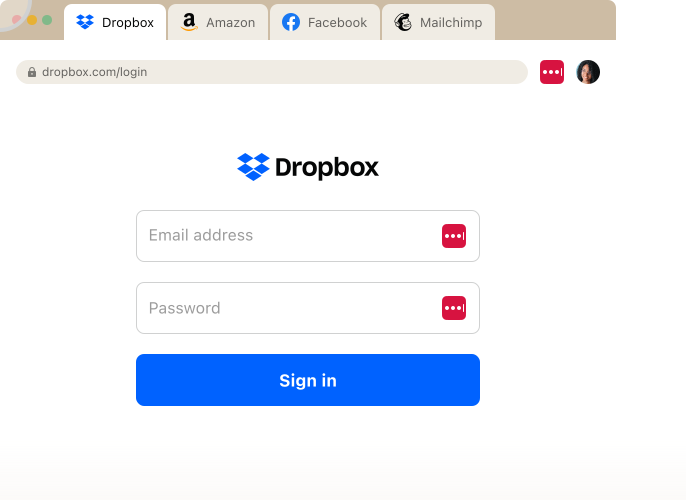
When someone signs up for a new tool or needs to update a password, it generates a strong, randomized one right in the browser, customizable by length and complexity. It's also the same extension SaaS Monitoring and SaaS Protect run through, so that visibility and control come built into a tool your team already uses.
Over 120 admin policies
Admin policies are the rules that dictate how your team logs in to their tools.
With LastPass, you can set more than 120 of them and apply each one to specific users, groups, or your entire organization. These policies are easy to enable and require no technical customization on your end, so you don't need a dedicated security specialist to manage them.

A few examples of the policies you can set:
-
You can require MFA before they open banking portals, without adding that step for everyone else.
-
You can set a 16-character password minimum, while general employees stay at 12.
-
You can give contractors shorter lockout periods and no offline vault access on shared machines.
-
You can block logins from TOR networks across your whole organization.
You can set these to specific users, entire groups, or the whole organization.
Security dashboard
The Security Dashboard gives you an overall security score across everyone enrolled. It breaks down who has weak passwords, who's reusing their master password, and whether any employee email addresses have appeared in known data breaches through dark web monitoring. You get a read on your team's credential health in one view, without ever seeing anyone's actual passwords.
This active security monitoring was a big win for Paul Longega, Managing Director at Love Struck. "LastPass alerts us to password vulnerabilities, checks if any credentials have appeared in data leaks or on the dark web, and rates the strength of our passwords. Having that level of automated monitoring has been incredibly valuable." (Read the full Love Struck case study.)
Next steps: managing shadow IT with LastPass
Shadow IT management is the work of finding the unapproved tools your team uses, deciding which ones are safe, and governing the rest without getting in their way. For most small to midsize businesses, the hard part has been doing that without a dedicated security team or an expensive CASB.
LastPass handles it through tools your team already uses.
Our SaaS Monitoring feature shows you which apps people are logging into and how, and our SaaS Protect tool lets you block, warn on, or allow each one, app by app. Because both run through the browser extension your team already uses for autofill, you can get started without installing agents or standing up new infrastructure.
Plus, you get the credential security that comes with a password manager: an encrypted vault for every employee, one-click autofill in the browser, more than 120 admin policies to control how people log in, and a Security Dashboard that flags weak passwords, reused credentials, and any logins exposed in a breach.
To see how LastPass can help you manage shadow IT across your team, you can start a free trial or schedule a demo.


