
But once you convince your company to give LastPass a go, you may run into the issue of keeping your current, personal account separate from your newly-created Enterprise account. However, you also don't like the idea of managing two different LastPass accounts. And that's where Linked Accounts comes in!
Our new option to "Link Personal Account" allows you to integrate your personal account with your Enterprise account, without mixing your personal data with your business data.
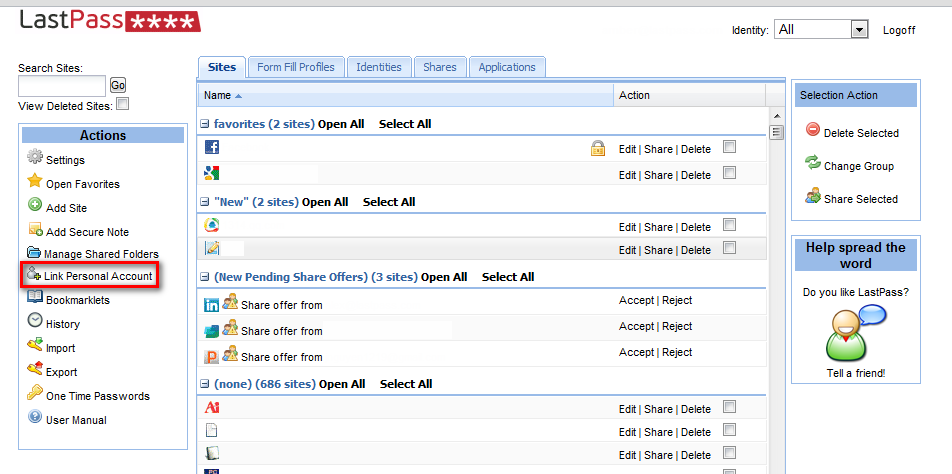
Getting set up with Linked Accounts is easy. Just login to lastpass.com with your Enterprise account. Once you're logged in, you can click on the "Link Personal Account" link on the left-hand Actions menu:
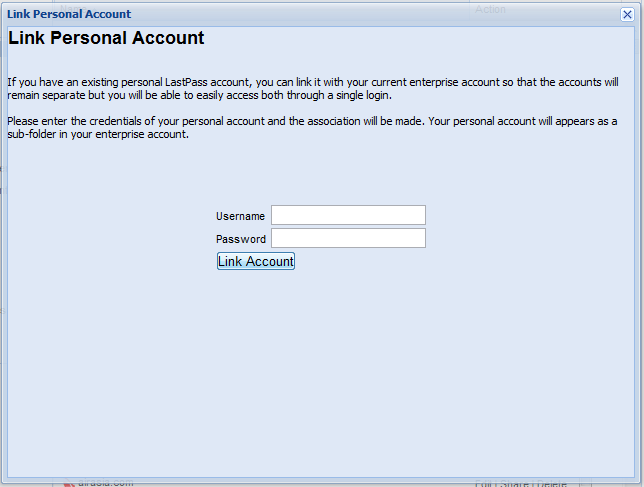
 When prompted, you can then login with your personal account. And voila! Your personal LastPass account will now appear as a sub-folder in the vault of your Enterprise account, and you will be able to view, edit, and login to your personal sites as usual.
Whatever company policies have been created by your organization for LastPass Enterprise will be applied to that sub-folder when you are logged in via your Enterprise account. However, you can still login separately to your personal account, and those Enterprise policies will not be transferred over, nor will the login activity for the sub-folder or your personal account be reported to the Enterprise Admin. Any updates you make to the sub-folder will automatically be pushed back to your personal account.
More great LastPass Enterprise updates are on the way. Try adding your LastPass account to your Enterprise account today - and if this has held you back from starting a trial for your company, check out LastPass Enterprise to see if it meets your company's needs!
Thanks,
The LastPass Team
When prompted, you can then login with your personal account. And voila! Your personal LastPass account will now appear as a sub-folder in the vault of your Enterprise account, and you will be able to view, edit, and login to your personal sites as usual.
Whatever company policies have been created by your organization for LastPass Enterprise will be applied to that sub-folder when you are logged in via your Enterprise account. However, you can still login separately to your personal account, and those Enterprise policies will not be transferred over, nor will the login activity for the sub-folder or your personal account be reported to the Enterprise Admin. Any updates you make to the sub-folder will automatically be pushed back to your personal account.
More great LastPass Enterprise updates are on the way. Try adding your LastPass account to your Enterprise account today - and if this has held you back from starting a trial for your company, check out LastPass Enterprise to see if it meets your company's needs!
Thanks,
The LastPass Team


