
Without a password manager, your team defaults to whatever's fastest, not what's most secure. People reuse the same password across tools, save credentials in the browser, and share logins over Slack to move quickly. None of that is tracked, which leaves credentials scattered across browsers and chat threads with no record of who can access what, and one reused password that gets phished can open far more than the account it came from. To get that under control, most businesses start comparing password managers, and LastPass and Bitwarden are two of the names that come up most often.
These tools are often listed side by side, but they're built for different buyers.
- Bitwarden is built around open-source code and self-hosting, which makes it a strong fit for technical teams that want to manage the tool themselves.
- LastPass is built for businesses that need to see and control how their team accesses tools, with admin policies, SaaS and AI visibility, fast onboarding and offboarding, SSO, and support you can reach when something breaks.
That fundamental difference gets lost in most "LastPass vs. Bitwarden" comparisons, because most of them focus on personal use, that means covering free plans, individual pricing, solo features, and barely touch the business side. This comparison is written for businesses that are considering these tools to help them store and share credentials, monitor employee behavior, and keep their organization secure.
You can start a free LastPass trial or schedule a demo any time. If you'd rather see how the two stack up first, keep reading.
LastPass vs. Bitwarden at a glance
Note: While both products offer personal plans as well as business plans, this article focuses on the business plan options.
|
|
LastPass |
Bitwarden |
|
Built for |
Small to midsize businesses, including non-technical users |
Technical teams that value open-source code |
|
Admin policies |
120+ policies, scopable to users, teams, or the whole organization |
Around 18 policies, no per-user or per-group scoping |
|
SaaS & AI visibility |
SaaS Monitoring and SaaS Protect detect and control non-vaulted app usage |
Access Intelligence sees only apps already stored in the vault; no shadow IT detection or blocking |
|
Sharing |
Folder-based sharing with group and per-user permissions |
Collection-based and organization-owned, with no nested folders or direct individual-item sharing (uses the Send feature for text and files) |
|
Account recovery |
Admin reset (Business tier), plus self-serve options like biometric mobile recovery and a one-time recovery password |
Admin reset (Enterprise tier, requires the user to be enrolled beforehand); limited self-serve |
|
SSO (identity provider) |
Built-in SSO and native IdP integrations (Okta, Azure AD / Entra, Google Workspace) |
No built-in SSO IdP |
|
Provisioning |
SCIM provisioning with native IdP integrations |
SCIM available, but defaults to manual admin confirmation for each user; automatic confirmation is Enterprise-only and requires Bitwarden enablement plus security prerequisites |
|
Security monitoring |
Security Dashboard, dark web monitoring, and real-time alerts |
Credential-risk dashboard with manual report refresh; no comparable continuous SaaS/AI discovery or app-level allow/warn/block controls. |
|
Support |
Phone and live chat, plus email |
Email and ticket only, no phone support |
|
Open source / self-hosting |
Closed-source, cloud-based |
Open-source, Cure53-audited, with self-hosting available |
|
Encryption |
256-bit AES with a zero-knowledge approach |
Zero-knowledge approach, PBKDF2 with optional Argon2id |
|
Ease of use |
Built for non-technical end users |
Functional, but commonly described as less polished |
In our table, we didn't include pricing because a single per-user number hides more than it reveals. The two platforms don't line up tier for tier, and the cheapest business plan on either side often leaves out features a team actually needs (Bitwarden's entry plan, for one, doesn't include admin policies, SSO, or account recovery). What matters is the total cost of the plan that covers your requirements, which we break down below. Further, we pulled the information for this comparison table in May 2026, and the specific details are subject to change.
You’ll also see in the table above that encryption is one place where the two are effectively even. Both use a zero-knowledge approach, so neither vendor can see your stored data, and for a business buyer encryption isn't the deciding factor. The differences that matter show up in how each tool handles access across a team.
Key LastPass features for businesses

LastPass offers a safe and user-friendly password manager for businesses, with advanced secure access features normally found only in more complex enterprise tools. With LastPass, you can simplify how your team stores and shares credentials, discover which SaaS and AI tools your employees are using, and control how they access them, including whether to block, warn against, or approve specific applications.
Specifically, we help businesses maintain secure access across their organization with:
- SaaS and AI visibility: see which tools your team is using and how they're logging in.
- Granular access control: set over 120 admin policies and scope them to users, teams, or the whole organization.
- Fast onboarding and offboarding: add or remove access without resetting shared passwords.
- Compliance and stack integrations: native IdP integrations, SSO, and a certification stack.
- Browser-based deployment: roll LastPass out across your organization without device agents.
You can start a free trial, schedule a demo, or keep reading to learn more about the features that matter most for business teams.
See which AI tools and SaaS platforms your team is using
Your team needs SaaS and AI tools to do their jobs, and without a secure access system in place, people sign up for them with a work email without checking with IT. In fact, 59% of organizations say employees adopt SaaS tools without running them by IT first.
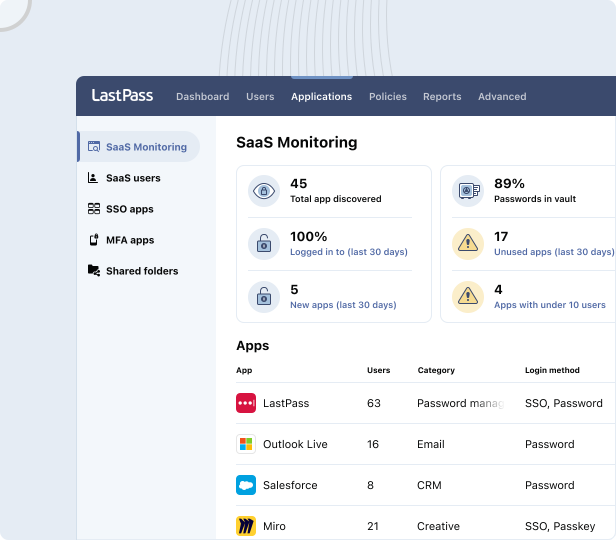
LastPass gives you that visibility through the same browser extension your team already uses for autofill.
- SaaS Monitoring shows you which applications are in use and whether the credentials behind them are managed or unmanaged.
- SaaS Protect lets you go a step further and block, warn against, or approve specific apps.
- The Security Dashboard flags credentials that are weak, reused, or compromised, all without ever exposing the actual passwords.
That control matters most when you're trying to keep up with how fast new tools spread.
Wout Zwiep, a Process Engineer at Axxor (a manufacturer operating across the Netherlands, Poland, and the US), put it this way: "People are experimenting with AI tools like OpenAI and Canva. We don't want to block innovation, but we do want to guide it safely." Guiding usage instead of shutting it down is exactly what SaaS Protect is built for. (Read the full Axxor case study)
Customize access permissions for individual users, teams, or the whole organization
Different people in your organization carry different risks. With over 120 admin policies, you can set rules by user, by team, or across the whole organization, rather than applying one set of restrictions to everyone.

You also get a range of MFA options, including an authenticator app, hardware keys like YubiKey, biometrics, and location-based access controls, plus passwordless login through FIDO2. Sharing runs through folders with group and per-user permissions, so you can give a group or an individual exactly the access they need.
Let's say your finance team logs into a banking portal while a contractor only needs a shared project board. You can require stricter MFA and tighter sharing rules for finance without forcing that same friction on everyone else.
Securely store and share confidential information from your vault
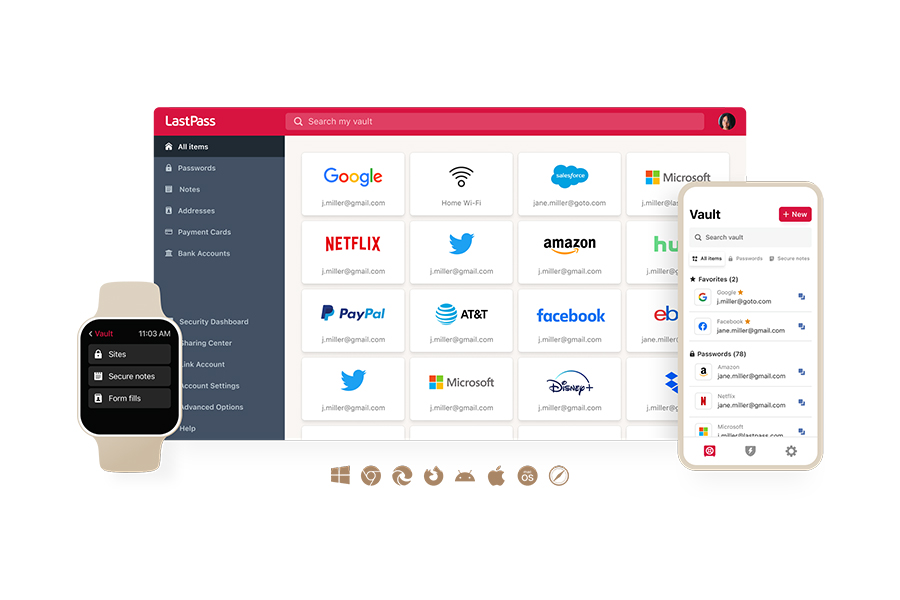
The vault is where your team's credentials actually live. Everything is encrypted locally with 256-bit AES before it ever reaches our servers, and we use a zero-knowledge approach, meaning we never have access to your stored data.
The vault holds more than passwords. You can organize it into folders that store usernames and passwords alongside the other business information your team needs to protect, like secure API tokens, Wi-Fi credentials, and payment cards. As an admin, you decide which folders to share with which people.
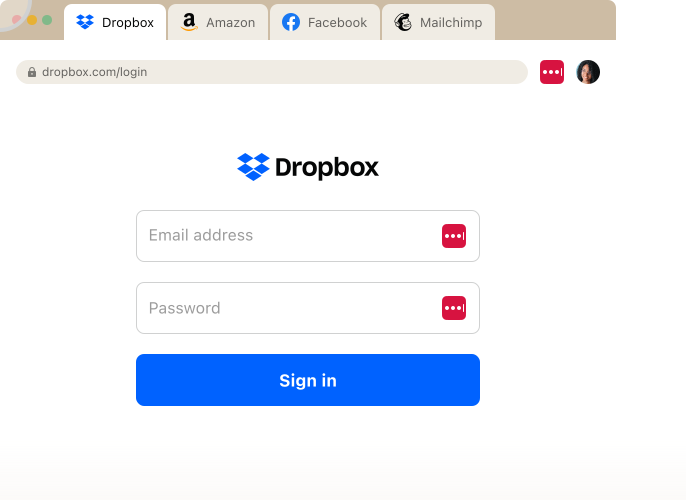
Your team reaches the vault through the browser extension (Chrome, Firefox, Safari, and Edge) and the mobile apps, so credentials are available wherever they work. When someone lands on a site they already have credentials for, LastPass autofills the username, password, and any MFA code in one click. When they sign up for something new, LastPass generates a strong, randomized password right in the browser, customizable by length and complexity.
If an employee forgets their master password, they're not necessarily locked out for good. Because we use a zero-knowledge approach, we can never reset a master password ourselves (we don't have it). But when a user signs in through the browser extension or mobile app, recovery data is stored on their own device, which gives them self-serve options like biometric mobile account recovery and a one-time recovery password. And in LastPass Business, you can enable the Super Admin Master Password Reset policy so a designated admin can reset a user's master password without wiping their vault, as long as they've logged in through the extension at least once.
Safely offboard employees without resetting passwords
When someone leaves, the risk isn't just the accounts you remember to close. It's the shared logins nobody tracked. With LastPass, you revoke access through the Sharing Center without resetting every shared credential, and native IdP integrations let you cut access at the identity layer.
Neil Bell, InfoSec Manager at Forsters LLP (a London law firm with more than 500 employees), described the problem before they centralized: "We needed a corporate password management solution. It wasn't consistent, centralized, or secure. The risk of losing access to systems when people left the firm was high." For a firm handling private client and commercial real estate work, removing that offboarding risk is the point. (Read the full Forsters LLP case study)
Compliance and stack integrations
LastPass fits into the stack you already run. You get out-of-the-box IdP integrations with Okta, Azure AD / Entra, and Google Workspace, plus SIEM support and 120+ policies to enforce and report on your compliance requirements. And when you need to extend single sign-on across your apps, LastPass offers built-in SSO and a pre-integrated catalog that covers popular apps even when there's no native IdP connection.
That last part matters most at scale. Tony Ledbetter, Senior IT Security Manager at HOLT CAT (a Caterpillar equipment dealer with more than 3,500 employees across 350+ applications), framed the stakes: "With over 350 applications for a team of 3500+ employees, our risk of exposure was high and in order to comfortably enable SSO, LastPass was a vital investment as it confirms every access point and login is protected." HOLT CAT started with 2,500 seats and expanded to 3,500 in their second year, reaching 70% adoption with employees requesting access on their own. (Read the full HOLT CAT case study)
LastPass also holds ISO 27001, ISO 27701, SOC 2 Type II, SOC 3, and BSI C5 certifications, so the controls you enforce are backed by independent audits.
Plus, LastPass is easy to deploy across your organization
Because LastPass works from the browser, you can deploy it across your organization without installing device agents. Employees get one-click autofill that can include MFA TOTP codes, plus autofill for new account signups, so adopting the tool doesn't slow anyone down.
OTO Technology, a managed service provider rolling LastPass out across France, the US, and Japan, runs onboarding sessions that take under five minutes per user. Plus, the less friction there is to get started, the more likely your team is to use it instead of falling back on old habits. (Read the full OTO Technology case study )
If you want to see how quickly it deploys for your team, you can start a free trial or schedule a demo.
Key Bitwarden features for businesses

Bitwarden is a team password manager built on open-source code, publicly auditable, and regularly audited by Cure53. When open-source transparency is a requirement for your organization and your team is technical enough to manage the tool with minimal hand-holding, Bitwarden is worth considering.
Open-source code, self-hosting, and developer tooling
Bitwarden is built around open-source code and tooling aimed at technical teams. The code is public and regularly audited by Cure53, which appeals to security-conscious and technical buyers. Bitwarden offers self-hosting for organizations that want full control over their infrastructure, plus EU and US data residency for cloud-hosted accounts, so it fits teams with data sovereignty requirements.
Native cross-device sync, browser extensions, and mobile apps are included out of the box. For developer and DevOps workflows, there's a CLI, an API, and a Secrets Manager. The password generator creates Diceware-style passphrases with adjustable word count, separators, capitalization, and numbers, and Argon2id is available as an alternative to PBKDF2. Pricing is low, with a generous free tier and rates below most competitors.
Admin controls, sharing, and provisioning
Bitwarden's interface is functional but commonly described as less refined than premium competitors, and its admin model is more limited than LastPass's.
Around 18 admin policies are available, with no ability to scope policies to specific users or groups. Sharing works through "Collections" rather than shared folders, items are owned by the organization with no nested folder hierarchy, and there's no direct sharing of individual items (you use the text-based Send feature instead).
Bitwarden doesn't offer built-in SSO as an identity provider. SCIM can auto-create accounts, but by default each one still needs manual admin confirmation (invite, accept, confirm) before the user is active. Automatic confirmation is available, but only on the Enterprise tier and only after Bitwarden enables it and you meet its security prerequisites.
SaaS visibility and support
Bitwarden has Access Intelligence, which flags weak or reused credentials and includes a phishing blocker. But Access Intelligence only has visibility into applications where credentials are already stored in Bitwarden. It can't detect non-vaulted logins or show you which SaaS and AI tools employees are accessing outside the vault, and there's no way to block or restrict access to unapproved applications. Support is email and ticket-based only, with no phone support, which may be a challenge for lean IT teams that need fast answers.
When your team is technical and comfortable managing the tool themselves, Bitwarden offers a solid, transparent option at a competitive price point. When you're looking for more built-in admin controls, SaaS visibility, or hands-on support, Bitwarden may require more work on your end.
For more information, you can view Bitwarden's pricing details.
LastPass vs. Bitwarden pricing
While Bitwarden leads on entry price — it has a generous free tier — the catch is what the entry plan includes. Bitwarden's Teams plan doesn't cover admin policies, SSO, or account recovery. Those key features sit in its higher Enterprise tier. So the lowest Bitwarden price and a plan that actually administers a team aren't the same thing, and the gap between them is the number that matters.
That's the real question for a business buyer: total cost, not sticker price. A lower per-user rate can still cost you more if it leaves gaps, you fill another way. If you need SaaS and AI visibility, scoped admin policies, SSO, or phone support, those capabilities either come with your plan or they don't. When they don't, you end up paying for another tool, building the reporting yourself, or absorbing the risk.
LastPass scales across tiers the same way, so it's worth knowing where the features you need actually land. Teams covers small groups. Business adds 100+ policies, groups, directory integrations, and federated login. The advanced secure-access capabilities, like SaaS Monitoring, SaaS Protect, unlimited SSO apps, and advanced MFA, sit in Business Max. Where you land depends on how much admin control and visibility your team needs.
You can compare current per-user pricing for both on their pricing pages:
Next steps: choosing between LastPass and Bitwarden
Both LastPass and Bitwarden are capable password managers, and the right choice comes down to what your team needs. Bitwarden is a strong fit if open-source code and self-hosting are your priorities, and if your team is technical enough to manage the tool with minimal hand-holding.
LastPass is built for the other case: businesses that need to see and control how their team accesses tools, without standing up an enterprise security program to do it. If you're securing access for a mix of technical and non-technical employees, you want admin policies you can scope to the people who actually need them, visibility into the SaaS and AI tools your team signs up for on its own, and a way to onboard and offboard people without resetting shared passwords. That's the work we built LastPass around.
You also get support you can reach when something breaks, and a tool your team will adopt instead of working around. That combination is why more than 100,000 businesses use LastPass today, from small teams to organizations running hundreds of applications.
The fastest way to see whether it fits is to try it with your own team in mind. You can start a free LastPass trial or schedule a demo and walk through SaaS Monitoring, scoped admin policies, and onboarding the way your business would actually use them.


